Skip to content
Black Friday · £20 off orders £240+ with code SAVE20 · Free chain with selected kits › £20 off orders £240+ with code SAVE20 ›
Free chain with selected WHEELTOP kits · Ends 1 Dec

WHEELTOP EDS OX 2.0 Wireless Electronic MTB Rear Derailleur, IP67

Derailleur Cage
£183.00
Black Friday · £20 off orders £240+ SAVE20

Enter code SAVE20 in your cart or at checkout on orders £240+ (eligible items £40+, 1 use per customer).

In Stock

Questions before you buy? Email us · We reply within 24 hours.
WHEELTOP EDS OX 2.0 Wireless Electronic Rear Derailleur

A fully wireless electronic rear derailleur engineered for mountain bikes, flat‑bar road bikes, and folding bikes. Built‑in battery, IP67 weather sealing, and 3–14 speed compatibility — premium electronic shifting without the cables. Pairs with the WHEELTOP EDS OX 2.0 wireless shifter (sold separately) or your existing OX 2.0 shifter.

Before you order, please check

Drivetrain

1x (single chainring) only. 3–14 speed, set in the free WHEELTOP app for iOS and Android.

Cage and cassette

Pick the cage by your largest cog: 58mm up to 32T · 75mm up to 42T · 93mm up to 52T.

UDH frames

Partially compatible. The derailleur bolts onto the UDH hanger (not a direct mount). A small number of frames may rub near the smallest cog.

Shipping

Duties Prepaid (DDP) to the United Kingdom

Orders to the United Kingdom ship DDP (Delivered Duty Paid): we prepay import duties and taxes, so nothing extra is collected at delivery. We currently ship to UK addresses only.

WHEELTOP EDS OX 2.0 Complete Kit — Derailleur + Shifter

This Listing Is the Rear Derailleur Only

Need the complete setup? Shop the OX 2.0 Complete Kit — derailleur and wireless shifter together.

New OX 2.0 Electronic Rear Derailleur

Wheeltop OX2.0 rear derailleur

Trail‑Tough Build

The built‑in battery is rated for 20,000+ shifts per charge, and the magnetic connector snaps on to charge. A windowed protective cover shields the motor, and the sealed housing keeps dirt and water out.

Adjustable Chain Stabilizer

A precision‑tensioned chain stabilizer suppresses chain slap and prevents dropped chains on rough terrain. The full aluminum alloy construction keeps the body rigid under load — reliable whether you're cruising fire roads or hammering technical singletrack.

Full Control from Your Phone

Download the WHEELTOP app to pair, tune, and monitor your derailleur, all from your phone.

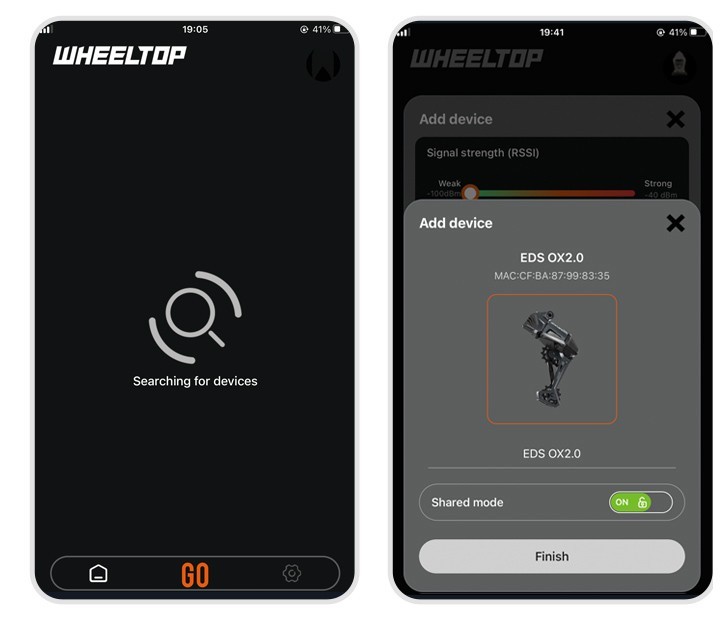
WHEELTOP app searching for and adding the EDS OX2.0 device
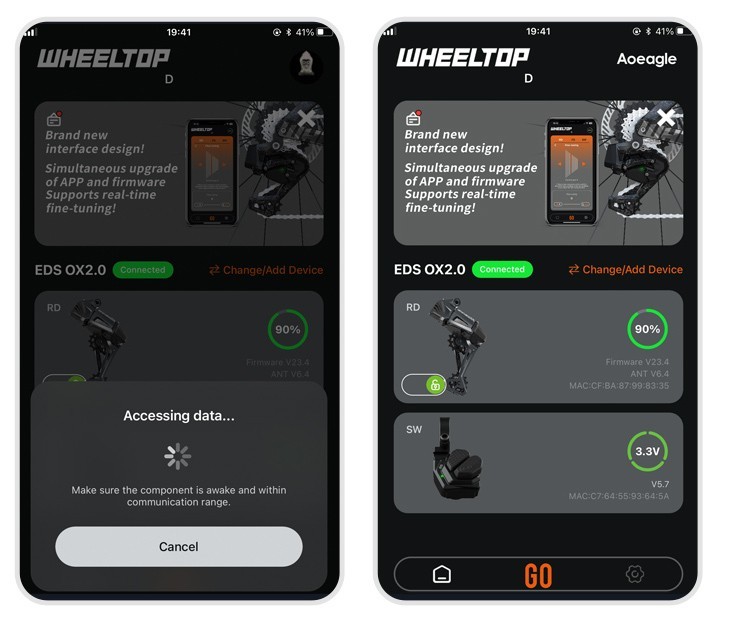
WHEELTOP app connecting and showing rear derailleur and shifter with battery levels

Step 1

Pair Your Components

Parts ship switched off: attach the magnetic charging cable briefly to wake the derailleur. Open the WHEELTOP app and tap + Start Using. It searches for nearby EDS OX2.0 components over Bluetooth, showing a Searching for devices screen. Once your derailleur turns up, select EDS OX2.0 and tap Finish — the app connects automatically, showing an Accessing data… prompt while it connects. Keep the derailleur powered on and within range. When it's done, the home screen lists your connected components — the rear derailleur, plus the shifter if one is paired — each showing its live battery reading, with the derailleur card also listing firmware version and MAC address.

Live Battery at a Glance

Every connected component shows its live charge level on the same home screen before every ride.

WHEELTOP app rear derailleur control screen and flywheel settings

Step 2

Set Your Cassette Speed

Open the RD tab to view current gear position, then tap Flywheel settings and select the speed count of your cassette so the derailleur knows how many gears to index across. On a SRAM cassette, simply choose the matching speed count.

Not Locked to One Speed Count

Unlike a mechanical derailleur built for one fixed speed, EDS OX2.0 is set up in software: choose the speed count of the cassette you already run, directly in the app.

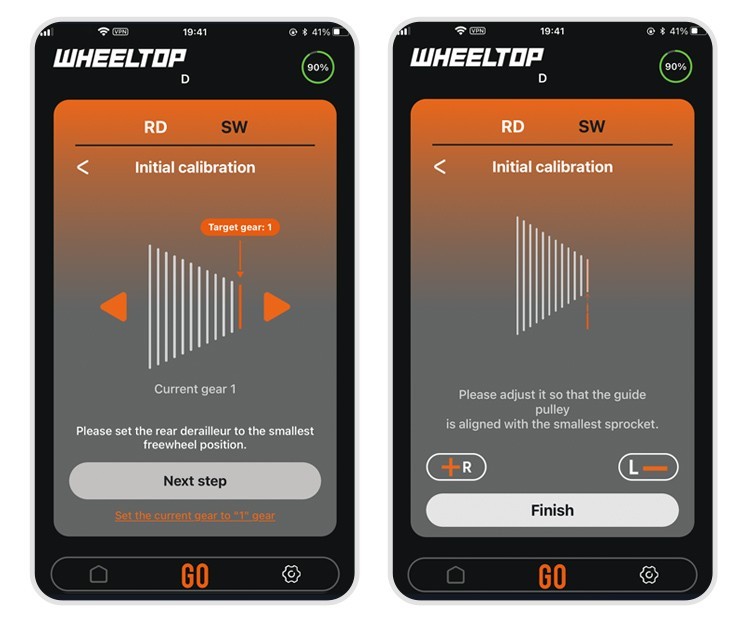
WHEELTOP app initial calibration screen

Step 3

Run Initial Calibration

Shift the chain onto the smallest cog, tap Next step, then use the on‑screen controls to fine‑align the guide pulley under the smallest sprocket.

Guided On‑Screen Alignment

No guesswork — use the on‑screen +R / −L controls to nudge the guide pulley until it sits precisely under the smallest sprocket, then tap Finish.

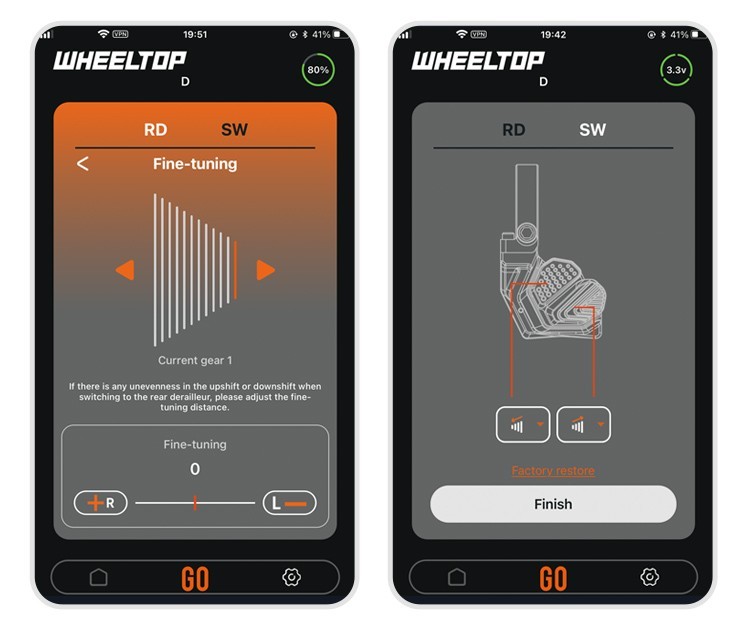
WHEELTOP app fine-tuning screen and shift button customization

Step 4

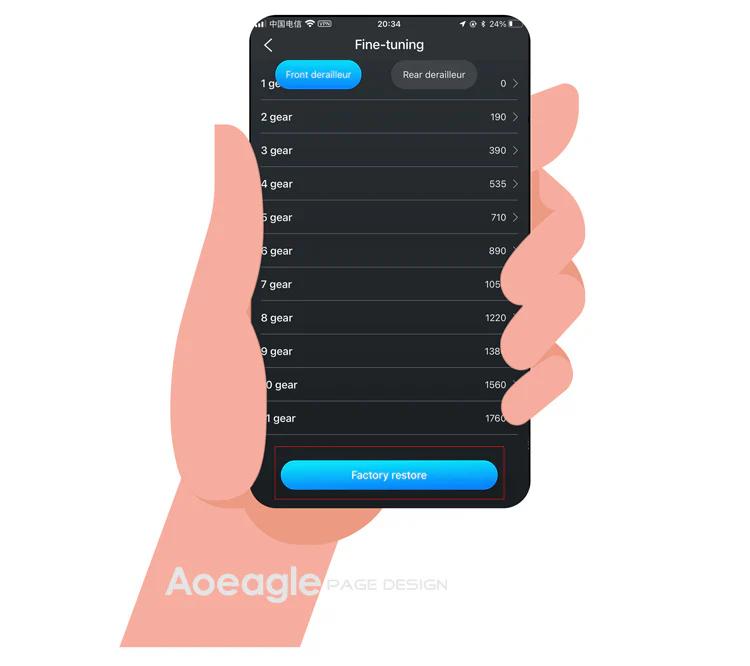
Fine‑Tune and Customize

If you notice any unevenness in the upshift or downshift, dial in the fine‑tuning distance on the RD tab. If you use an OX 2.0 shifter, the SW tab lets you assign what each of its buttons does — no two riders shift the same way.

Set It Once, Ride Your Way

With an OX 2.0 shifter, reassign its upshift and downshift buttons to trigger whichever function feels natural, or tap Factory restore to reset instantly.

Ride Data and Turn‑by‑Turn Navigation

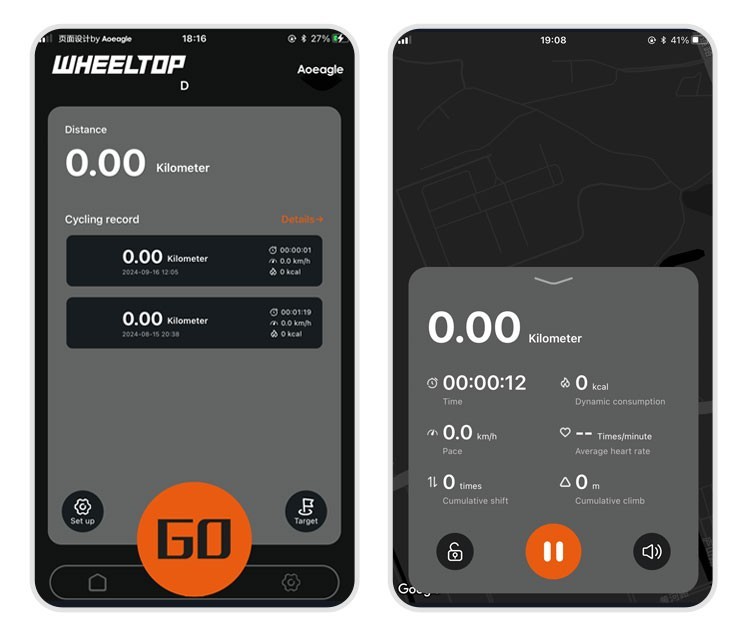
WHEELTOP app ride screen and cycling record history

Switch to the ride screen for distance tracking and a full history of past rides — each entry logged with duration, average speed, and calories burned.

Live Stats While You Ride

Tap GO in the bottom bar to switch into the ride screen, where elapsed time, calories, pace, average heart rate, cumulative shifts, and climb update in real time alongside turn‑by‑turn map navigation.

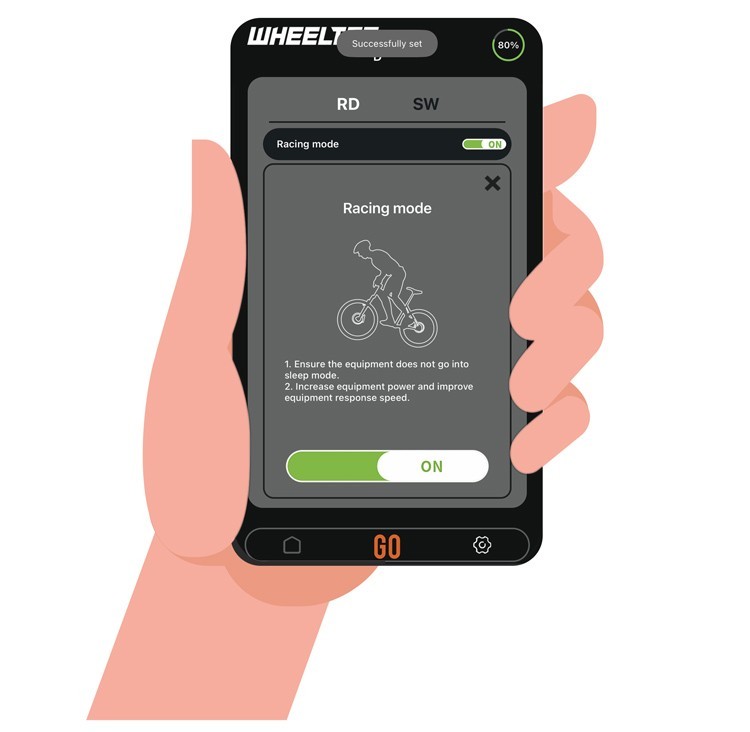
Two Riding Modes. One Tap to Switch.

WHEELTOP app Racing mode toggle screen

Switch between Standard and Racing mode directly in the app. Each mode is tuned for a different riding style — no tools, no hassle.

Standard Mode

Auto‑sleep when idle. Lower power draw, longer battery life. Perfect for long days in the saddle.

Racing Mode

Always‑on, maximum responsiveness. Boosted signal power for noise‑resistant shifting under pressure.

3–14
Speed compatibility
IP67
Dust‑tight · 1m submersion
20,000+
Shifts per full charge
800mAh
Built‑in lithium battery

Specifications

Full technical breakdown of the OX 2.0 wireless electronic rear derailleur.

Brand WHEELTOP
Model EDS OX 2.0 Wireless Electronic Rear Derailleur
Application Mountain Bikes, Flat‑Bar Road Bikes, Folding Bikes
Speed Range 3–14 Speed (configurable in app)
Cage / Cassette 58mm cage 10-32T · 75mm cage 10-42T · 93mm cage 10-52T
Pulley 12T positive and negative teeth
Material Aluminum Alloy
Wireless Protocol BLE + ANT+ · pairs with cycling computers to show gear and battery
Charging Port Pogo‑Pin Magnetic Connector
Battery 800mAh built‑in lithium · 7.4V · 5.92Wh
Charge Indicator Red: charging · Light off: fully charged
Protection Rating IP67
Weight 397.5g
Warranty 1-Year Warranty

The Derailleur Cage Is Replaceable

The cage plate is secured by hex socket screws — swap it in minutes with a 3 mm hex key. Use a professional‑grade precision hex key (RC / model aircraft type recommended) — a cheap or worn key will strip the small screws instantly. Change cage length, replace a damaged cage after a crash, or upgrade when new cage options become available.

OX 2.0 replaceable derailleur cage

Replace Just the Cage

Bent cage after a rock strike? Replace just the cage — not the whole derailleur. Far more cost‑effective than replacing the entire unit.

Flexible Configuration

Switch between 58 mm (short), 75 mm (medium), and 93 mm (long) cages as your drivetrain changes — one derailleur body, multiple setups.

Which Cage Length Is Right for You?

The OX 2.0 comes in three cage lengths, each matched to a cassette range. The wrong cage affects shift quality and chain tension — confirm your largest sprocket before ordering.

OX 2.0 93mm Long Cage
93mm Long Cage

10 – 52T

Cassette Compatibility

Built for mountain bikes, single‑chainring flat‑bar road bikes, and gravel bikes. For wide‑range cassettes.

OX 2.0 75mm Medium Cage
75mm Medium Cage

10 – 42T

Cassette Compatibility

The sweet spot for single‑chainring flat‑bar road bikes, folding bikes 18" and above, and urban bikes running mid‑range cassettes.

OX 2.0 58mm Short Cage
58mm Short Cage

10 – 32T

Cassette Compatibility

Designed for 16"–20" folding bikes with compact drivetrains. For compact cassettes where clearance is tight.

Still not sure? Count the teeth on your cassette's largest sprocket and match it to the cards above. When in doubt, send us a message before ordering and we will help you pick the right one.

What's in the Box

×1

OX 2.0 Wireless Electronic Rear Derailleur

×1

Magnetic Charging Cable

×1

Type‑C Adapter

×1

Special Tailhook Backup Washer

×1

Quick‑Start Guide (scan QR code for installation video & instructions)

Check Your Derailleur Hanger

Please complete these two checks before fitting the WHEELTOP rear derailleur. Only install it once both are confirmed.

Check 1

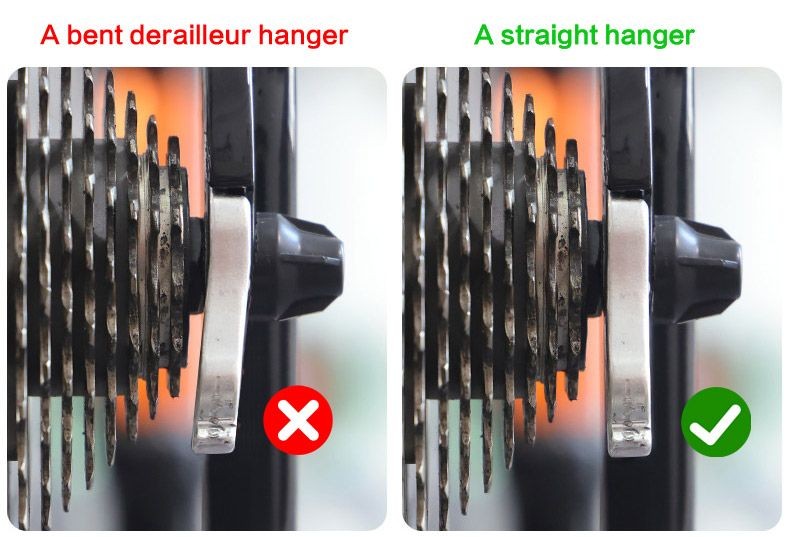
Is the Hanger Straight?

Bent derailleur hanger compared with a straight hanger

A bent hanger tilts the rear derailleur, which causes poor shifting, chain noise and difficult calibration, no matter how carefully it is set up.

How to check: look from behind the bike. The hanger should hang straight down, parallel to the cassette cogs. If it is bent, straighten it with a hanger alignment tool or fit a new hanger.

Check 2

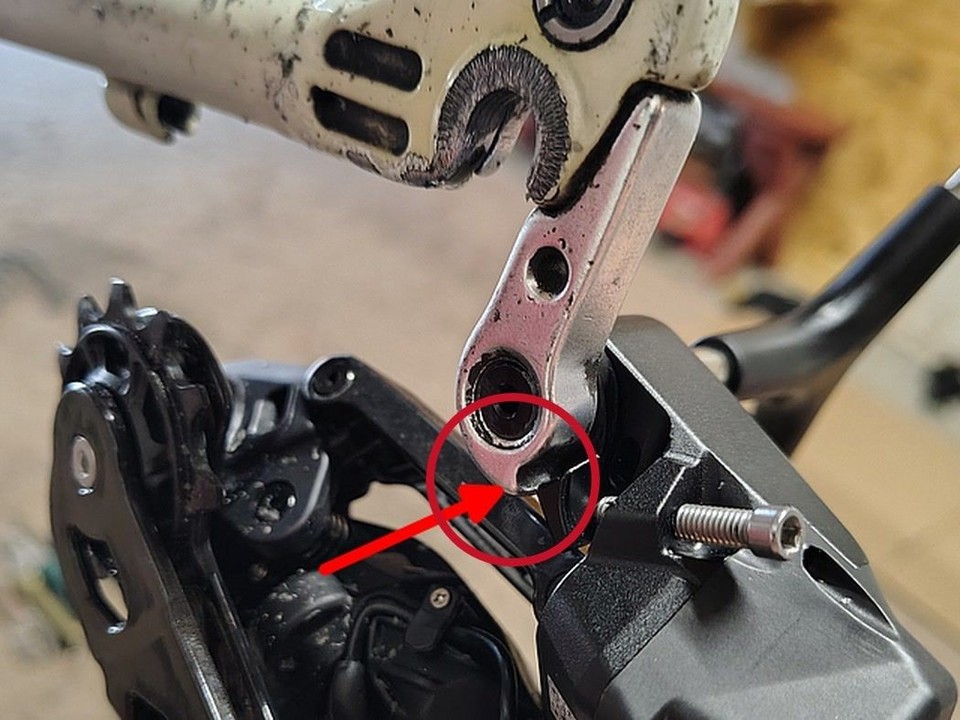
Does the Hanger Have a Step?

Derailleur hanger with a clear step: compatible
Compatible

Clear step at the bottom

Derailleur hanger with a very small step: not compatible
Not compatible

Very small step

The small tab next to the mounting bolt must rest on the step at the bottom of the hanger, so the derailleur can swing forward and back.

Small step? Fit a hanger with a larger step, or a derailleur hanger extender. Otherwise the derailleur stays rigid and cannot be set up.

Not sure? Send us a close‑up photo of your hanger by email to support@aoeagle.com before ordering, and we will check it for you.

Compatibility & Buyer Notes

Please review the following before purchasing to ensure correct fitment.

Requires a WHEELTOP EDS OX 2.0 Shifter

This listing is for the rear derailleur only. You'll need a WHEELTOP EDS OX 2.0 wireless shifter to control it — buy ours separately, or use one you already own.

UDH Frames: Mounts on the Existing Hanger, No Extra Parts

After installing the chain, shift to the smallest cog and check by hand for any rubbing before fine‑tuning limits in the app.

1x Drivetrain Only

OX 2.0 has no front derailleur or left‑hand shifter, so it is not for double or triple chainring setups.

Choose the Right Cage Length

Check your largest cog against the cage chart above before choosing the cage version.

App‑Based Setup Required

Initial calibration must be performed via the WHEELTOP app after installation.

Reviews

Reviews from our eBay store (aoeagle).

Feedback from buyers in our eBay store. It covers our whole store; the tabs show feedback for this item or for all items.

Loading reviews…

Which brand of cassette does it support?

The app lets you set the speed count and gear spacing: the TX supports 7–14 speed cassettes, Shimano and SRAM alike — just pick the matching speed in the app.

How to pair the app?

On the home page, click the [Add Device] button. The APP will automatically navigate to the nearby devices list page. Locate your device's MAC address, then click to add and bind it. After successful binding, you will need to name the device.

Step 1: Click the Add button on the home page Step 2: Turn on your phone’s Bluetooth to search for nearby devices
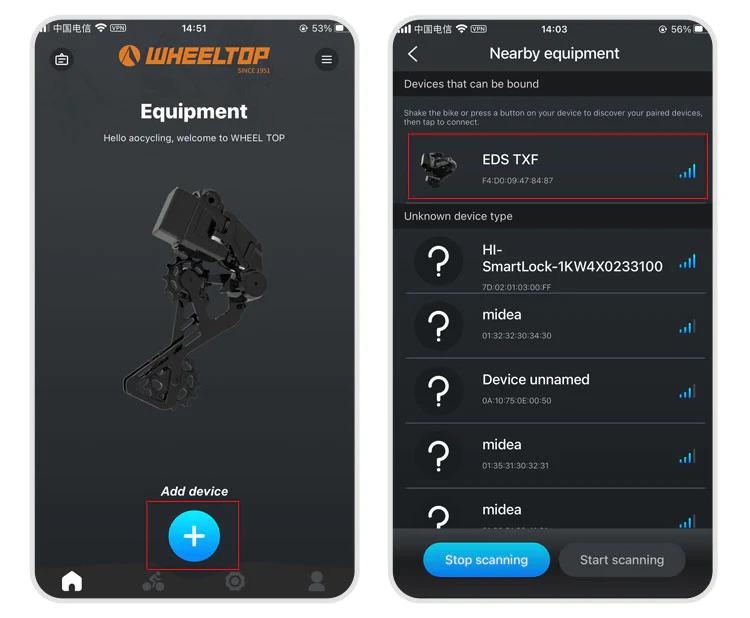
How to pair the app? illustration

Step 3: Select nearby bindable devices to add Step 4: Name the device
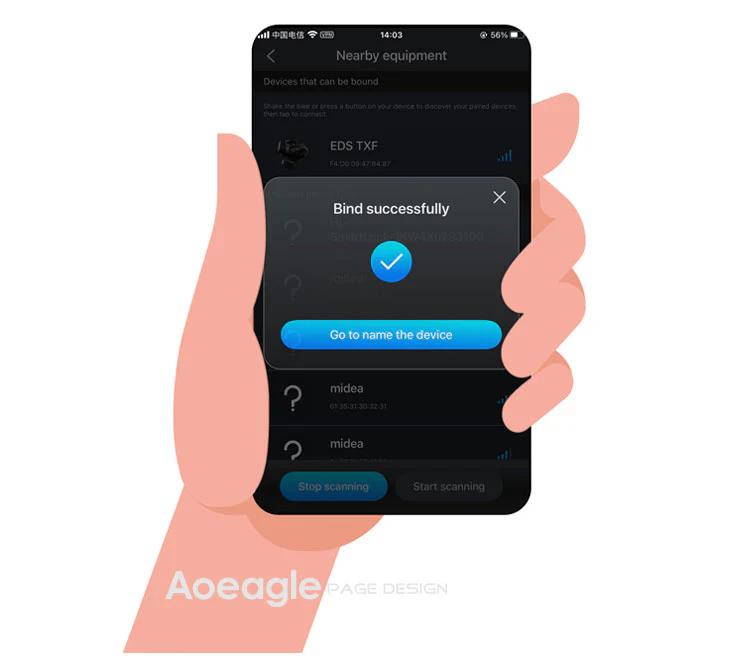
How to pair the app? illustration

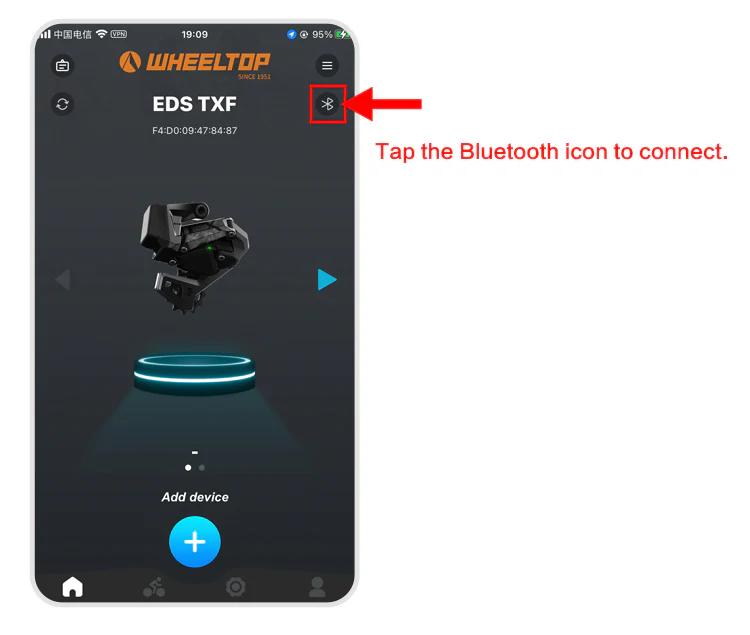
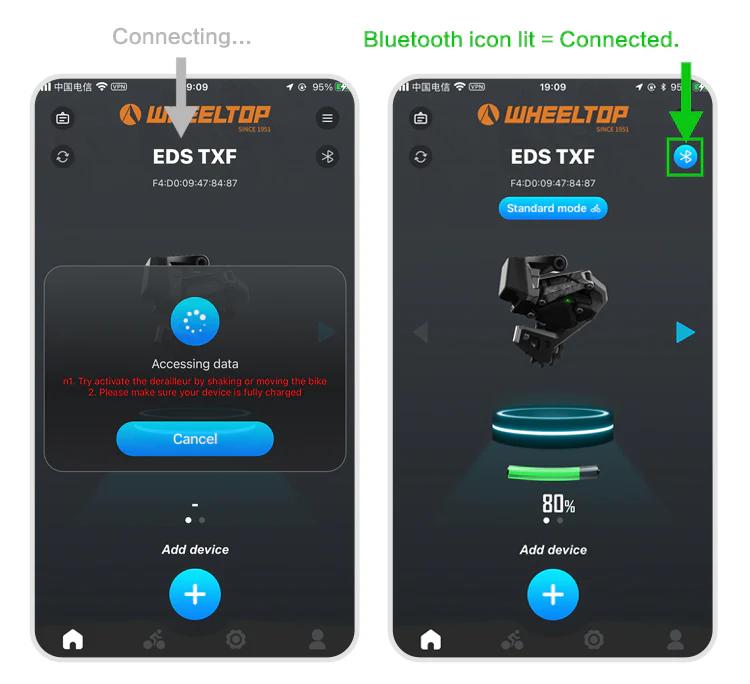
One last thing — and this is where a lot of users get stuck.

To connect, you need to tap the Bluetooth icon in the app. Before doing so, make sure the derailleur hasn't gone into sleep mode. If it has, just give the derailleur a tap or shake the bike to wake it up. Once the connection is successful, the Bluetooth icon will light up — and you're all set to start adjusting your derailleur.
How to pair the app? illustration How to pair the app? illustration
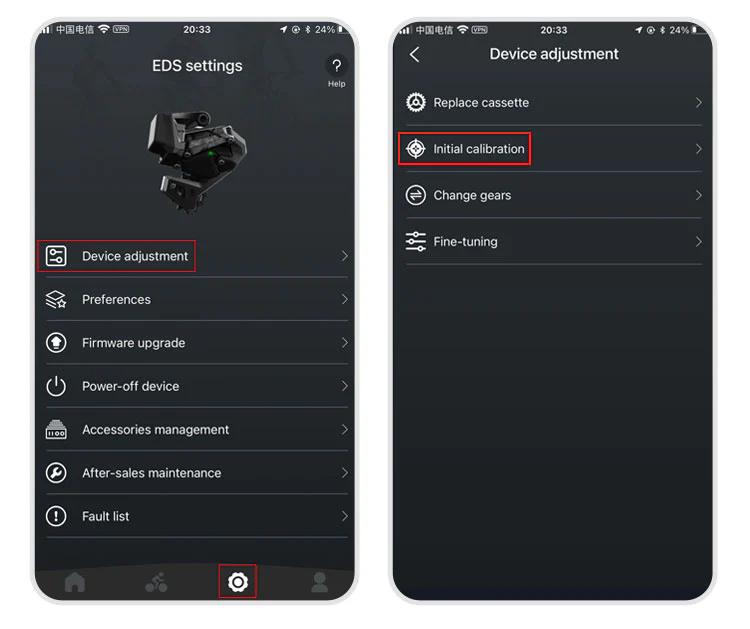
How to do the initial calibration?

For EDS TX series:

  1. Set the front derailleur to the largest sprocket
  2. Set the rear derailleur to the smallest cog position
  3. Open the WHEELTOP App → Initial Calibration
How to do the initial calibration? illustration

Use "<" or ">" buttons to align the RD pulley with the smallest cog
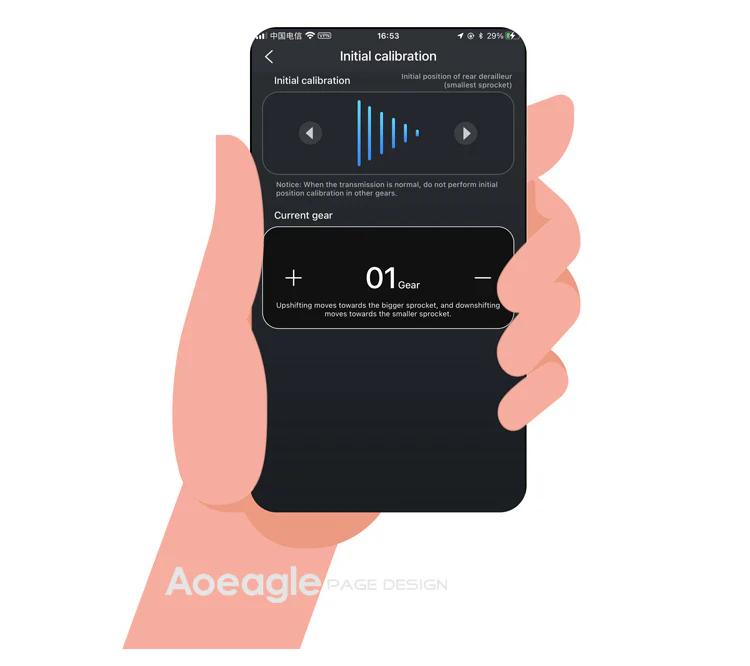
How to do the initial calibration? illustration

Exit the initial calibration page

For EDS GeX and OX series: Same steps but skip step 1 (no FD adjustment required).

How to download and register the WHEELTOP app?

WHEELTOP APP download:

How to download and register the WHEELTOP app? illustration

app Store

How to download and register the WHEELTOP app? illustration

Google Play

After successful registration, log in to the app.

You can also download the APK file directly: APK Download Link

For first-time use, please register with your email.

How to perform a factory restore?

It works like a factory reset for gear values. Use it when gear values have been misadjusted to restore the preset values.

Path: APP → Settings → Device-adjustment → Fine-tuning → "Factory-restore" button at the bottom.
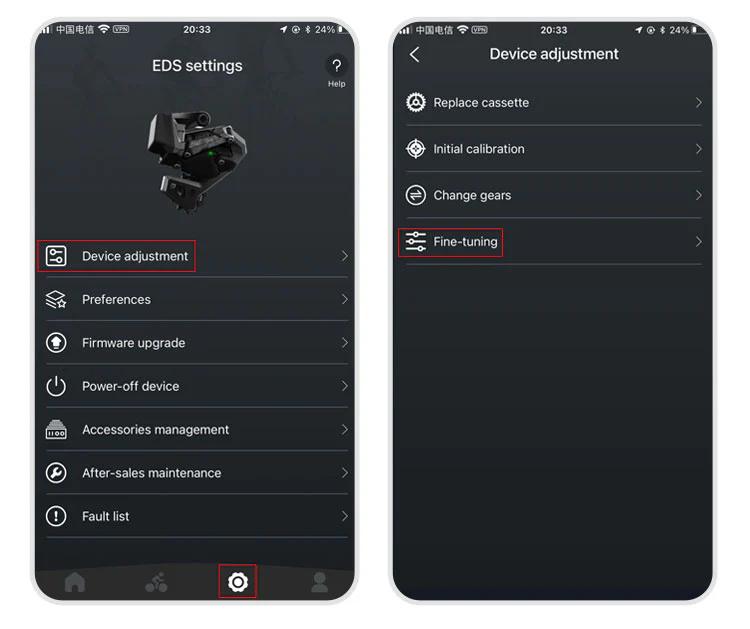
How to perform a factory restore? illustration How to perform a factory restore? illustration
The rear derailleur position is inconsistent with the APP display

1.Go to the initial calibration page in the APP 2.Select the rear derailleur (upper section) 3.Press the right arrow (▶) and hold until the RD moves back to the smallest cassette

More questions (7)
The device cannot shift immediately after not riding for a long time

1.Charge the system — a low battery can delay activation 2.Gently shake the frame — this helps wake up the rear derailleur more quickly

Can EDS be paired with bike computers?

Yes!EDS TX, OX2.0, and GeX can all be paired with bike computers.

How do I power off and power back on my WHEELTOP EDS device?

In the latest version of the WHEELTOP app, swipe left on the rear derailleur's device card to bring up the **Disconnect / Power Off** menu, then tap **Power Off**. This is useful for shutting the system down during shipping or storage. To power the device back on, plug in the magnetic charging cable for **2-3 seconds** — once the charging indicator light turns **red**, the device powers on and reactivates.

WHEELTOP app screen showing the swipe-left Disconnect / Power Off menu
Is it equipped with a rear derailleur clutch function?

OX2.0 and GeX are equipped with a rear derailleur clutch function.

How long does the battery last on a single charge?

A fully charged WHEELTOP EDS battery delivers 20,000+ shifts per charge, which translates to 60+ hours of typical riding before needing to recharge. This exceptional range means most cyclists can ride several days between charges, making the EDS derailleurs ideal for long tours and multi-day events.

For EDS OX, can I install a double chainring?

No. Due to its direct mount structure, the rear derailleur is only compatible with a single chainring system.

How do I pair the OX 2.0 shifter with the rear derailleur?
  1. Remove the back cover of the shifter and take out the existing CR2032 coin battery. Have a fresh coin battery (or a small metal object) ready.
  2. Plug the charging cable into the rear derailleur for 3–5 seconds until a red light appears, then unplug it right away. This step is critical — the derailleur only enters pairing mode once the charging cable is disconnected, so make sure it's unplugged before continuing.
  3. Go back to the shifter. With one hand, press and hold the large button on the shifter — don't let go. With your other hand, insert the coin battery, pressing it in with your thumb — don't let go of that either. After a few seconds the light should turn green. Press the shifter button once: if the rear derailleur moves, pairing is successful. Reattach the shifter's back cover in the correct orientation and tighten it.