Skip to content
Black Friday · £20 off orders £240+ with code SAVE20 · Free chain with selected kits › £20 off orders £240+ with code SAVE20 ›
Free chain with selected WHEELTOP kits · Ends 1 Dec

WHEELTOP EDS OX 2.0 Wireless Flat Bar Shifter SW-23011-R (Right), IP65

Shifter Model
£114.00
Black Friday · £20 off orders £240+ SAVE20

Enter code SAVE20 in your cart or at checkout on orders £240+ (eligible items £40+, 1 use per customer).

In Stock

Questions before you buy? Email us · We reply within 24 hours.
WHEELTOP EDS OX 2.0 Wireless Button‑Style Shifter

A compact, clean‑mounting wireless shifter with a satisfying mechanical‑keyboard‑style click; each press sends the shift to the derailleur wirelessly. Pairs with the WHEELTOP EDS OX 2.0 wireless rear derailleur (sold separately) or your existing OX 2.0 derailleur.

Shipping

Duties Prepaid (DDP) to the United Kingdom

Orders to the United Kingdom ship DDP (Delivered Duty Paid): we prepay import duties and taxes, so nothing extra is collected at delivery. We currently ship to UK addresses only.

WHEELTOP EDS OX 2.0 Complete Kit — Derailleur + Shifter

This Listing Is the Shifter Only

Need the complete setup? Shop the OX 2.0 Complete Kit — derailleur and wireless shifter together.

Button‑Style Shifter

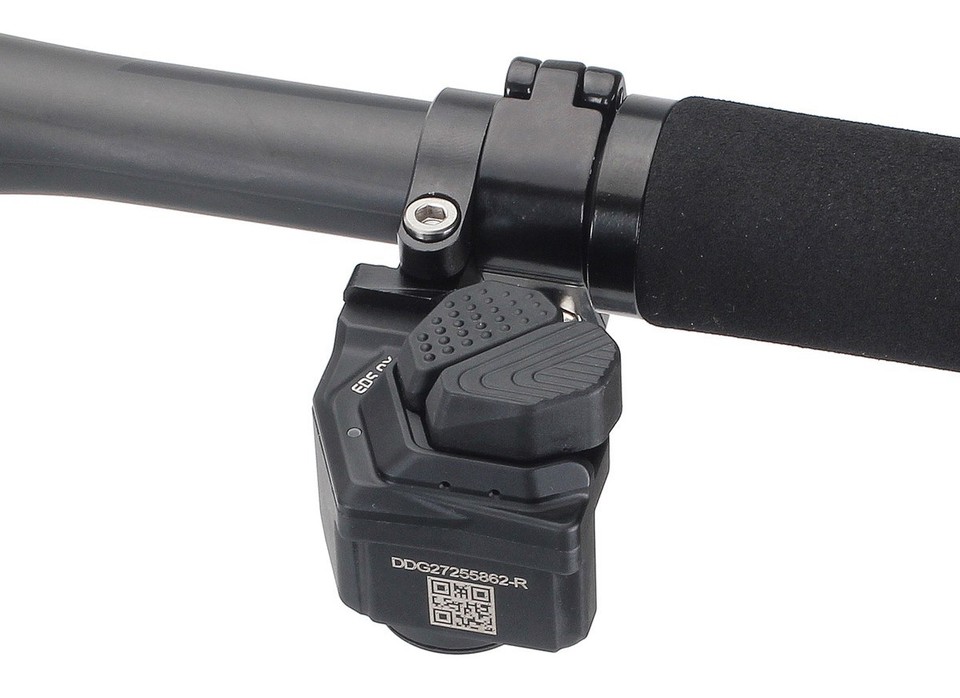
Wheeltop OX2.0 shifter mounted on flat handlebar close-up

Clean Design, Wireless Shifting

Clean, minimal design with a mechanical‑keyboard‑style click. Each press sends the shift to the derailleur wirelessly, so there is no cable to stretch or re‑adjust. The shifter is sealed against dust and water for wet rides.

Feel

Mechanical Click

Crisp, tactile feedback on every press

Response

No Shift Cable

Wireless signal, nothing to stretch or adjust

Weather

IP65 Sealed

Sealed against dust and water

Battery

CR2032

Standard coin cell, typically lasts over a year

Wheeltop OX2.0 shifter battery compartment cover back detail

CR2032 Battery — Easy to Replace with a Coin.

The battery compartment cover sits on the back of the shifter body. To swap the cell, use a coin to turn the cover open, replace the old CR2032 with a fresh one, then turn the cover closed again with the coin. Standard CR2032 cells are available at any supermarket, gas station, or electronics shop worldwide.

Specifications

Full technical breakdown of the OX 2.0 wireless button‑style shifter.

Brand WHEELTOP
Model EDS OX 2.0 Wireless Button‑Style Shifter
Application Mountain Bikes, Flat‑Bar Road Bikes, Folding Bikes
Compatible With WHEELTOP EDS OX 2.0 wireless electronic rear derailleur (sold separately)
Shifter Battery CR2032 coin cell
Protection Rating IP65
Weight 70g
Warranty 1-Year Warranty

What's in the Box

×1

OX 2.0 Wireless Button‑Style Shifter

Compatibility & Buyer Notes

Please review the following before purchasing to ensure correct fitment.

Requires a WHEELTOP EDS OX 2.0 Rear Derailleur

This listing is for the shifter only. It needs to be paired with a WHEELTOP EDS OX 2.0 wireless rear derailleur to shift gears — buy ours separately, or use one you already own. This shifter won't work as a standalone unit.

Replacement / Spare Shifter

Common uses: replacing a lost or damaged shifter, adding a second shifter for a multi‑bike setup, or buying the shifter and derailleur separately at different times.

Reviews

Reviews from our eBay store (aoeagle).

Feedback from buyers in our eBay store. It covers our whole store; the tabs show feedback for this item or for all items.

Loading reviews…

How to pair the app?

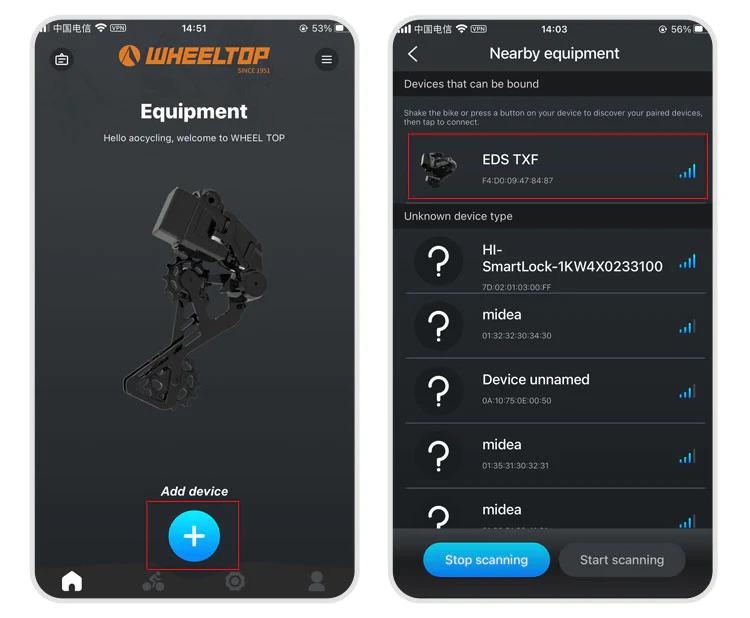
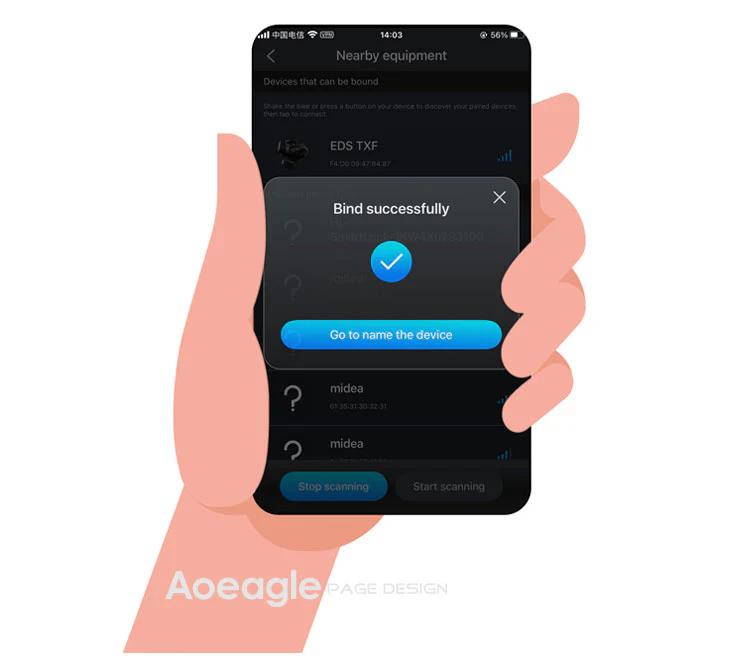
On the home page, click the [Add Device] button. The APP will automatically navigate to the nearby devices list page. Locate your device's MAC address, then click to add and bind it. After successful binding, you will need to name the device.

Step 1: Click the Add button on the home page Step 2: Turn on your phone’s Bluetooth to search for nearby devices
How to pair the app? illustration

Step 3: Select nearby bindable devices to add Step 4: Name the device
How to pair the app? illustration

One last thing — and this is where a lot of users get stuck.

To connect, you need to tap the Bluetooth icon in the app. Before doing so, make sure the derailleur hasn't gone into sleep mode. If it has, just give the derailleur a tap or shake the bike to wake it up. Once the connection is successful, the Bluetooth icon will light up — and you're all set to start adjusting your derailleur.
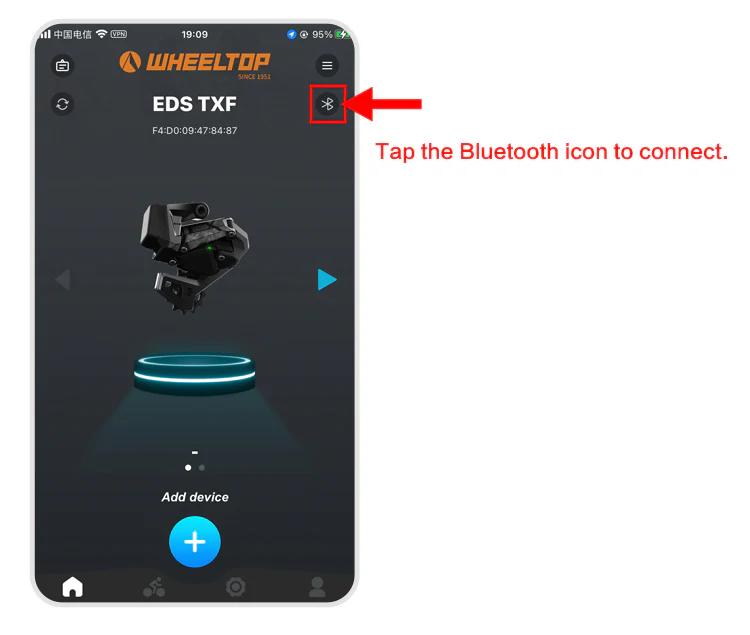
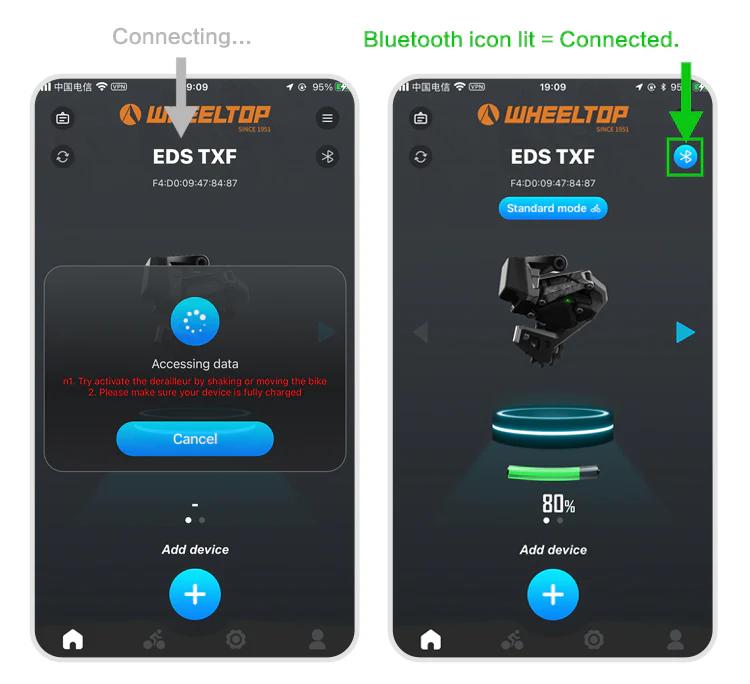
How to pair the app? illustration How to pair the app? illustration
How to download and register the WHEELTOP app?

WHEELTOP APP download:

How to download and register the WHEELTOP app? illustration

app Store

How to download and register the WHEELTOP app? illustration

Google Play

After successful registration, log in to the app.

You can also download the APK file directly: APK Download Link

For first-time use, please register with your email.

After pressing the shifter lever, the rear derailleur does not shift normally

1.Check the button indicator light: If there is no light, replace the battery and test again. 2.Check the light color: If the button is lit but not green (e.g. red or yellow), the device is not paired correctly. Re-pair following the manual.

How do I pair the OX 2.0 shifter with the rear derailleur?
  1. Remove the back cover of the shifter and take out the existing CR2032 coin battery. Have a fresh coin battery (or a small metal object) ready.
  2. Plug the charging cable into the rear derailleur for 3–5 seconds until a red light appears, then unplug it right away. This step is critical — the derailleur only enters pairing mode once the charging cable is disconnected, so make sure it's unplugged before continuing.
  3. Go back to the shifter. With one hand, press and hold the large button on the shifter — don't let go. With your other hand, insert the coin battery, pressing it in with your thumb — don't let go of that either. After a few seconds the light should turn green. Press the shifter button once: if the rear derailleur moves, pairing is successful. Reattach the shifter's back cover in the correct orientation and tighten it.