Skip to content
Black Friday · £20 off orders £240+ with code SAVE20 · Free chain with selected kits › £20 off orders £240+ with code SAVE20 ›
Free chain with selected WHEELTOP kits · Ends 1 Dec

WHEELTOP EDS TX Wireless Electronic 2x12s Groupset Full Kit Road Bike Rim Brake

Crankset
Cassette
Derailleur Cage
£483.00
Black Friday · Save £20 at checkout SAVE20

Enter code SAVE20 in your cart or at checkout to take £20 off (orders £240+, 1 use per customer).

In Stock

Questions before you buy? Email us · We reply within 24 hours.

WHEELTOP EDS TX Rim Brake — Full Groupset Bundle

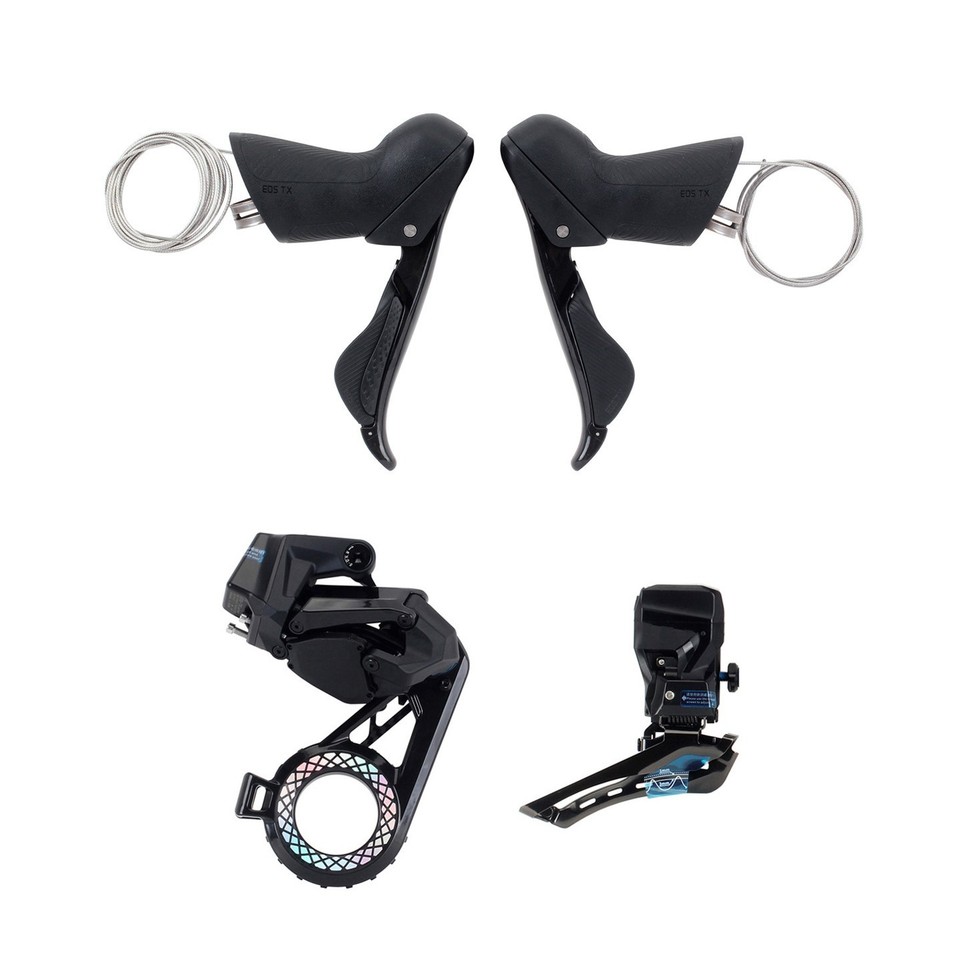
Everything you need to build a complete electronic drivetrain in one box — no separate crankset order, no cross-referencing a chain compatibility chart, no mismatched brake calipers. This bundle pairs the WHEELTOP EDS TX wireless electronic shifting kit (carbon fiber rim brake levers, front + rear derailleur) with an EVOSID SL1 DUB double chainring crankset, a 12-speed SUNSHINE-SZ cassette, a SUMC S12L 12-speed chain, and a pair of MEROCA BR-R7000 dual-pivot brake calipers. Pick your chainring ratio and cassette range below, and the rest of the drivetrain is matched and ready to install.

Before you order, please check

Brake type

This is the rim brake version. Please make sure it matches your bike's brakes.

Front derailleur

Braze-on mount. If your frame has no braze-on tab, a clamp-on adapter can be used on a round seat tube. We can supply one, just message us.

WHEELTOP EDS TX complete groupset bundle, all parts

Every Part, One Box

Shift Levers (Left + Right)
Rear Derailleur
Front Derailleur
Cassette
Chain
Bottom Bracket
Crankset
Brake Calipers

A Verified Combination, Not Just Parts in a Box

This isn't a random parts bundle — Aoeagle built this exact combination onto a complete bike and put it through rigorous testing to confirm smooth, precise shifting between these components and the WHEELTOP EDS TX before offering it as a set.

Electronic Rear Derailleur — 12-Speed

EDS TX rear derailleur

EDS TX Electronic Rear Derailleur

Driven by a built-in 800mAh rechargeable battery at 7.4V, the EDS TX rear derailleur shifts instantly on a button press — zero cable lag, zero stretch over time. The standard pulley wheel uses a 12-tooth positive/negative tooth profile for quieter, more secure chain engagement. Charges through a magnetic Pogopin connector — snap it on, no port covers, no corrosion.

Pre-Matched to This Bundle's 12-Speed Cassette

Set the EDS TX to 12-speed in the WHEELTOP app after pairing, and it's dialed in for the SUNSHINE-SZ cassette included in this bundle.

Oversized Pulley Cage Upgrade — Lower Friction, Higher Efficiency

The EDS TX Oversized Pulley Cage variant upgrades the rear derailleur with oversized hollow ceramic-bearing pulley wheels on a carbon fiber cage — available on this bundle as an upgrade option.

EDS TX oversized pulley wheel groupset

Carbon fiber cage plate with ceramic-bearing oversized pulleys

Oversized pulley wheel systems reduce the chain's wrap angle around each pulley, which means less chain articulation per revolution and measurably lower friction across the full drivetrain.

Same Platform. Hollow Ceramic-Bearing Pulleys.

The TX Oversized Pulley Cage shares the same 800mAh battery, Pogopin charging, BLE/ANT+ wireless, and app configuration as the standard TX rear derailleur. The performance gain comes entirely from the oversized hollow ceramic-bearing pulley wheel system — no learning curve, no setup difference.

EDS TX carbon fiber hollow oversized pulley close-up

Why Oversized? The Chain Wrap Angle Difference.

At 12 teeth, the oversized pulleys are physically larger than a conventional jockey wheel — letting the chain bend through a gentler arc at each engagement. Less arc per revolution means less per-link articulation friction across every pedal stroke. Hollow ceramic-bearing pulleys mounted on a carbon fiber cage keep the drivetrain quieter and more responsive under load.

Pulley Size

12T Oversized

Weight vs Standard

Lighter

Chain Arc

Gentler per Rev

Drivetrain Feel

Quieter · Smoother

Electronic Front Derailleur — Complete 2× Groupset

Every build ships with both the front derailleur and rear derailleur, matched to the EVOSID double chainring crankset below — a complete 2× drivetrain, ready to install.

EDS TX front derailleur

Precise Front Shifting on Demand

The EDS TX front derailleur runs on its own built-in 500mAh 7.4V rechargeable battery and shares the same magnetic Pogopin charging, and BLE/ANT+ wireless link as the rear unit. Pair both derailleurs to the WHEELTOP app for synchronized setup, gear mapping, and live status — front and rear shift in concert with a single button press from the lever.

FD Battery

500mAh / 7.4V

Built-in rechargeable lithium

Charging

Pogopin Magnetic

Red = charging, light off = full

Wireless

BLE / ANT+

Pairs with cycling computers

Weight

191.3g

Included with every build

Rim Brake — Carbon Fiber Lever

The EDS TX Rim Brake build pairs a carbon fiber lever body with the MEROCA calipers included in this bundle — electronic shifting precision, zero cable clutter.

EDS TX rim brake carbon fiber build

Standard Bundle

Rim Brake — Carbon Fiber

Carbon fiber lever body, standard 12T pulley rear derailleur. The lightest of the two builds.

Chainring setup2X (double chainring)
PulleysStandard 12T
CageCarbon
Front derailleur191.3g (included)
Rear derailleur336.6g
Left lever202.3g
Right lever214.6g
EDS TX rim brake oversized pulley cage build

Bundle + Upgrade

Rim Brake + Oversized Pulley Cage

Same carbon fiber rim brake lever, upgraded rear derailleur with oversized hollow ceramic-bearing pulley wheels on a carbon fiber cage. Measurably lower chain friction.

Chainring setup2X (double chainring)
PulleysHollow
CageCarbon Fiber
BearingsCeramic
Rear derailleur340g
Left lever202.3g
Right lever214.6g
Base platformSame 800mAh TX RD
EDS TX rim brake carbon fiber shift lever on road bike drop bar

Carbon Fiber Body. Rim Brake Compatible.

The carbon fiber lever body is lightweight, rigid, and built to actuate the MEROCA calipers included in this bundle through a standard rim brake cable. Shift electronically on a button press while braking through the lever in the same motion you already know. No hydraulic lines to bleed — just cleaner cockpit routing and instant gear response.

Lightest EDS TX Configuration

Without hydraulic calipers, the Rim Brake build is the lightest complete EDS TX kit.

EVOSID SL1 DUB Crankset — Forged Alloy Arms

Forged EVOSID SL1 crank arms on a DUB spindle, with a bottom bracket included.

EVOSID SL1 DUB crankset

Forged Alloy Arms on a DUB Spindle

The EVOSID SL1 crank arms are forged aluminum alloy, CNC-machined into a one-piece structure for high stiffness and crack resistance under hard pedaling. They run on a SRAM DUB-standard 28.99mm spindle.

Crank Length

170mm

165mm available on request

Spindle

DUB, 28.99mm

Q-Factor

146mm

Bottom Bracket Shell

68-73mm

Need 165mm Crank Arms?

170mm ships as standard. If you'd prefer 165mm, just leave a note with your order at checkout or send us a message, and we'll ship 165mm crank arms instead.

EVOSID SL1 left and right crank arms

Forged and CNC-Machined, Not Just Machined from Stock

Starting from a forged aluminum alloy blank rather than machining from bar stock gives the crank arm a stronger internal grain structure — the factory quotes roughly 15% lower weight and 20% higher stiffness on this crankset. The crank arms weigh 660g at 170mm or 609g at 165mm.

EVOSID BC1.37x24T threaded bottom bracket, 68-73mm shell, 90mm overall width

Bottom Bracket, Cups Included

The crankset ships with its matching EVOSID BC1.37"×24T bottom bracket. Overall width is 90mm and it accepts bottom bracket shells from 68mm up to 73mm wide, with included spacers (two 2.6mm gaskets, a 3mm spacer, and a 4.5mm spacer) to take up the difference.

Is Your Frame Compatible?

It is not a press-fit design.

EVOSID ES1204 Road Double Chainring

A one-piece double chainring that direct-mounts to the SL1 crank arms, matched to the EDS TX front derailleur above.

EVOSID ES1204 one-piece road double chainring close-up

ES1204: One Piece of CNC 7075 Aluminum

Both rings are CNC-machined from a single piece of 7075 aerospace-grade aluminum and finished in sand-blasted anodized black. The one-piece construction stays rigid without the extra hardware of two separately bolted rings — the complete chainring weighs just 169g (50-34T) or 170g (52-36T).

Shift Ramps for Fast Upshifts

Dedicated tooth profiles and chain-guide ramps on the big ring catch the chain cleanly as it climbs from the small ring, for quick, predictable front shifts. Tooth tips are also width-optimized to reduce chain and ring wear.

Compact

50-34T

The easier-spinning ratio — noticeably more manageable on long climbs and rolling terrain. The natural pick for most road and gravel riders, and for anyone pairing with the wider 11-32T or 11-34T cassette options below.

Mid-Compact

52-36T

A taller top end for faster group rides and flatter routes, while the 36T inner ring still leaves a manageable gear for moderate climbs. Best suited to stronger riders or those on rolling-to-flat terrain.

SUNSHINE-SZ 12-Speed Cassette — Three Range Options

Precision-cut 12-speed cogs — pick the range that matches your terrain.

This Cassette Uses Shimano HG Freehub Bodies

SRAM XD freehub body
SRAM XD
Shimano HG freehub body
SHIMANO HG

HG Driver Only — Not XD/XDR Compatible

Confirm your rear hub's freehub body before ordering.

SUNSHINE-SZ 12-speed cassette

Each cog is precision-machined for clean, quiet engagement, and the whole cassette is a straightforward drop-in — no special driver needed. Because the EDS TX sets its speed count entirely in the app rather than through a fixed cable-pull ratio, it indexes cleanly against whichever range you choose below.

Close Ratio

11-28T

11-12-13-14-15-16-17-19-21-23-25-28T · 306g

Tight steps between gears for flat-to-rolling roads where you want to hold a precise cadence. Pairs naturally with the 52-36T chainring.

All-Rounder

11-32T

11-12-13-14-15-17-19-21-23-25-28-32T · 367g

The middle-ground range — enough spread for mixed terrain and moderate climbs without giving up too much at the close end. A safe default for most riders.

Wide Range

11-34T

11-12-13-15-17-19-21-23-25-28-31-34T · 388g

A genuine bail-out gear for hillier routes or riders who'd rather spin than grind. Pairs well with the 50-34T chainring for a climb-friendly setup.

SUMC S12L Semi-Hollow Chain — 12-Speed

Speed-matched to the cassette above, and the chain we run on the oversized pulley cage for clean, quiet engagement.

SUMC S12L 12-speed chain in retail pack, gold and silver

Semi-Hollow Plates. Gold & Silver Finish.

The SUMC S12L is a dedicated 12-speed chain with semi-hollow plates in a gold and silver finish, compatible with Shimano, SRAM and Campagnolo 12-speed drivetrains. A quick link is included. Supplied at 126 links — trim to fit your frame during installation.

Speed

12-Speed

Matched to the included cassette

Links

126

Trim to length on install

Weight

263.6g

Approx. net weight

Pitch

1/2"

Inner width 11/128"

MEROCA BR-R7000 Dual-Pivot Brake Calipers — Front & Rear

A matched pair of dual-pivot calipers, sized to work with the carbon fiber rim brake levers included in this bundle — one less part to source separately.

MEROCA BR-R7000 dual-pivot brake calipers

Aluminum Alloy Body. Dual-Pivot Balance.

The BR-R7000 caliper body is aluminum alloy, lightweight with high rigidity — the arm doesn't flex or deform under hard braking, so lever force translates directly into stopping power. A dual-pivot balanced structure keeps both brake arms applying force in sync, transmitting braking power evenly with no fishtailing under a hard stop and no fade on long descents.

High-Rebound Return Spring

A high-rebound spring keeps lever response and return fast for a direct, controlled feel — fine-tune brake force to reduce lock-up and rim-rub risk on technical descents.

MEROCA BR-R7000 adjustable brake pad detail

Adjustable Pads. Anti-Squeal Compound.

Each brake pad is adjustable — 47mm of range at the top, 70mm at the bottom — for precise alignment to the rim's braking surface and easy compensation as the pads wear. The pad compound itself is a low-noise, wear-resistant formula with a widened mud/sand channel, cutting down on the high-frequency resonance that causes brake squeal.

Front Caliper

200g

27mm mounting bolt

Rear Caliper

194g

13mm mounting bolt

Arm Dimensions

76mm height

68mm arm width

Application

Aluminum Rims

Standard road C-brake mount

Full Control from Your Phone

Download the WHEELTOP app to pair, tune, and monitor your drivetrain — all from your handlebars.

WHEELTOP app searching for and selecting the EDS TX device
WHEELTOP app connecting and showing all four components with battery levels

Step 1

Pair Your Components

Open the WHEELTOP app and tap + Start Using. It searches for nearby EDS TX components over Bluetooth, showing a Searching for devices screen. Once your derailleur turns up, select it and name it yourself, then tap Finish — the app connects automatically, showing an Accessing data… prompt while it pairs — just keep the derailleur powered on and within range. When it's done, the screen switches to Connected, and the home screen lists all four components — rear derailleur, front derailleur, and both shift levers — each showing its live battery reading, with the rear and front derailleur cards also listing firmware version and MAC address.

All Four Components, One Screen

The Connected view puts the rear derailleur, front derailleur, and both shift levers on one screen, so you can check every component's charge level at a glance before a ride.

WHEELTOP app flywheel settings screen

Step 2

Set Your Cassette Speed

Tap the settings icon in the bottom corner, then open Flywheel Settings and select your cassette's brand and speed so the derailleur knows exactly how many gears to index across.

Not Locked to One Speed Count

Unlike a mechanical derailleur built for one fixed speed, EDS TX is fully configurable — set whatever speed count you're running, directly in the app.

WHEELTOP app initial calibration screen

Step 3

Run Initial Calibration

Shift the rear derailleur onto the smallest cog and the front derailleur onto the largest chainring, then start calibration in the app.

Guided On-Screen Alignment

No guesswork — use the on-screen +R / −L controls to nudge the guide pulley until it sits precisely under the smallest sprocket, then tap Finish.

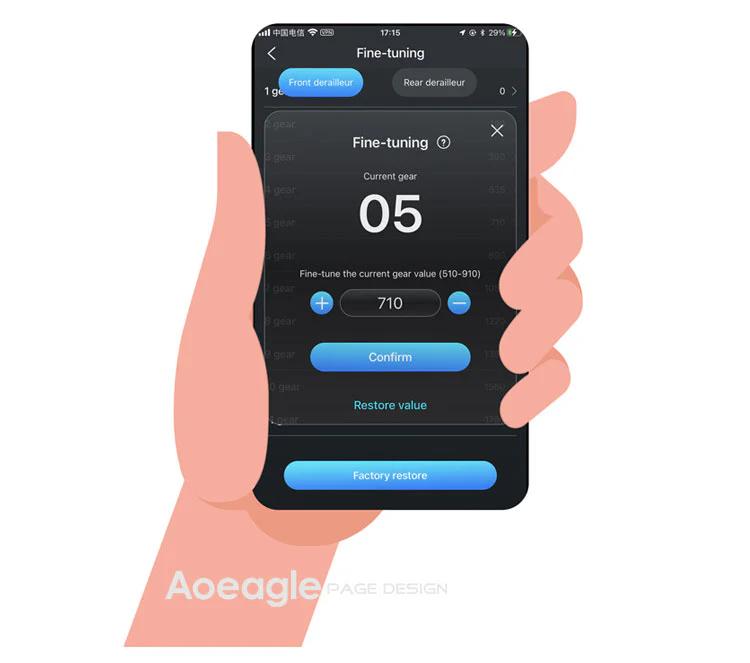
WHEELTOP app gear fine-tuning screen

Step 4

Fine-Tune Every Gear

If you notice any chain rub when shifting between chainrings, dial in each gear individually on the Fine-Tuning screen.

Need to Go Further?

Open Rear Derailleur Gear Parameters to view or manually edit the exact position value for any gear, then save — a level of precision cable systems simply can't match.

Other Settings

WHEELTOP app shift button customization screen

Customize Your Shift Buttons

Assign what each button on the left and right shift levers does — no two riders shift the same way.

Set It Once, Ride Your Way

Reassign the SW-L and SW-R paddles to trigger whichever shift function feels natural, or tap Factory Restore to reset instantly.

WHEELTOP app home screen and ride computer

Ride Data and Turn-by-Turn Navigation

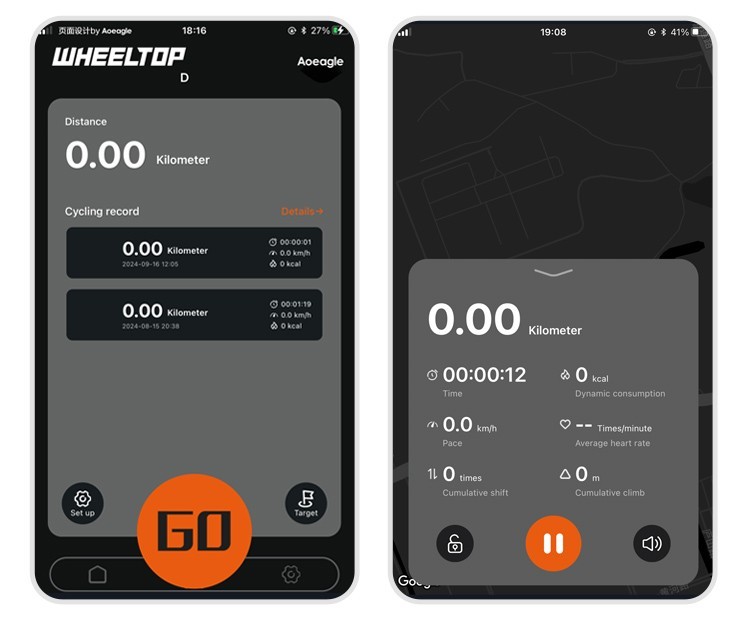
Switch to the ride screen for distance tracking and a full history of past rides — each entry logged with duration, average speed, and calories burned.

Live Stats While You Ride

Tap GO in the bottom bar to switch into the ride screen, where elapsed time, calories, pace, average heart rate, cumulative shifts, and climb update in real time alongside turn-by-turn map navigation.

WHEELTOP app firmware update screen

One-Tap Firmware Updates

When a new firmware version is available, the app flags it right on the home screen for the affected component.

Stay Current, Wirelessly

Tap to review what's new, then update over the air — just make sure the component has enough charge before you start.

Two Riding Modes. One Tap to Switch.

WHEELTOP app Standard and Racing mode switch screen

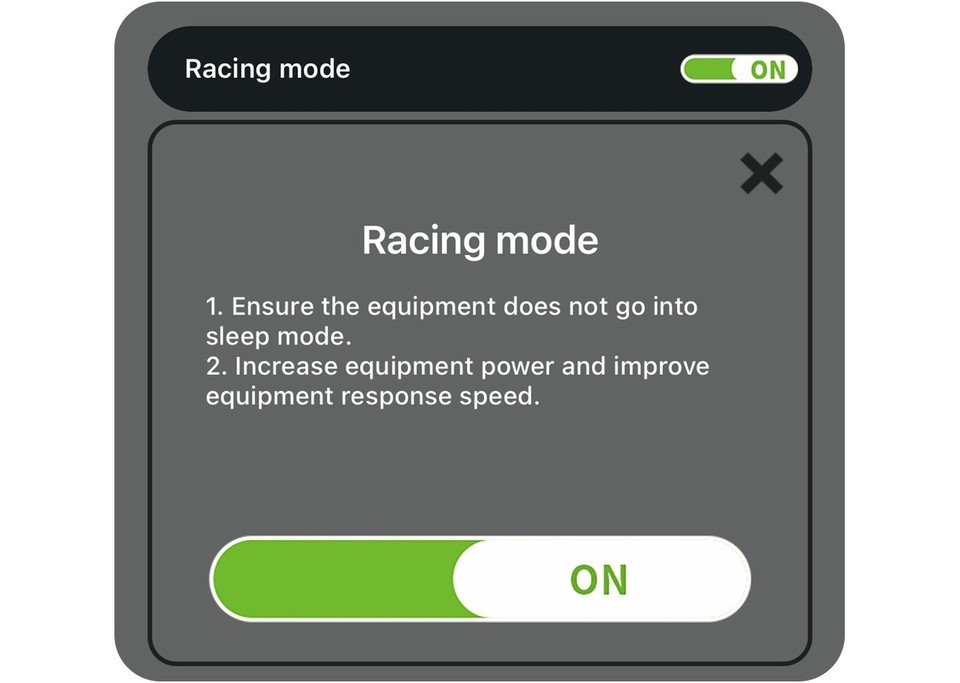
Switch between Standard and Racing mode directly in the app. Each mode is tuned for a different riding style — no tools, no hassle.

Standard Mode

Auto-sleep when idle. Lower power draw, longer battery life. Perfect for long days in the saddle.

Racing Mode

Always-on, maximum responsiveness. Boosted signal power for noise-resistant shifting under pressure.

9
Core drivetrain parts, one box
12-Speed
Cassette, chain & shifting matched
20,000+
Shifts per RD charge
BLE+ANT+
Dual-protocol wireless

Specifications

Full technical breakdown of every part included in this bundle.

Brand WHEELTOP (shifting) · EVOSID (crankset) · SUNSHINE-SZ (cassette) · SUMC (chain) · MEROCA (calipers)
Model EDS TX Rim Brake Wireless Groupset Bundle
Suitable For Road bikes and drop-bar bicycles with a threaded BSA (68-73mm) bottom bracket shell and front derailleur mount
Speed 12-Speed (set in the WHEELTOP app to match the included cassette)
Cassette SUNSHINE-SZ 12-Speed (Shimano HG driver) — 11-28T (306g) · 11-32T (367g) · 11-34T (388g)
Chain SUMC S12L, 12-speed, semi-hollow, 126 links, approx. 263.6g, quick link included
Crankset EVOSID SL1, forged & CNC-machined crank arm, 170mm (165mm on request), DUB 28.99mm spindle · EVOSID ES1204 one-piece 7075 double chainring, 50-34T or 52-36T · EVOSID BC1.37"×24T threaded BB (68-73mm) included
Brake Calipers MEROCA BR-R7000, aluminum alloy dual-pivot, front 200g / rear 194g, adjustable pads (47mm/70mm range)
Rear Derailleur Pulley Standard: 12-tooth positive/negative tooth profile · Optional: oversized hollow ceramic-bearing pulley wheels on a carbon fiber cage
Wireless Protocol BLE / ANT+ — pairs with cycling computers, displays current gear position and battery level
Charging Port Pogopin magnetic connector · Red light = charging, light turns off when fully charged
Battery Capacity Rear derailleur 800mAh · Front derailleur 500mAh · System voltage 7.4V
Shifter Battery CR2032 button cell (tool-free replacement)
Weight — Shifting Kit Front derailleur 191.3g · Rear derailleur 336.6g (340g with Oversized Pulley Cage) · Left lever 202.3g · Right lever 214.6g
Warranty 1-Year Warranty (electronic shifting components)

What's in the Box

This bundle includes the full parts list below. The Oversized Pulley Cage build includes oversized hollow ceramic-bearing pulley wheels on a carbon fiber cage instead of the standard 12T pulleys.

×1

EDS TX Electronic Rear Derailleur

×1

EDS TX Electronic Front Derailleur

×2

Integrated Rim Brake Shift Levers — Carbon Fiber (Left + Right)

×1

EVOSID SL1 DUB Crankset (ES1204 double chainring, choice of 50-34T or 52-36T)

×1

EVOSID Bottom Bracket (with spacers)

×1

SUNSHINE-SZ 12-Speed Cassette (choice of range)

×1

SUMC S12L 12-Speed Chain (126 links, quick link included)

×2

MEROCA BR-R7000 Dual-Pivot Brake Calipers (Front + Rear)

Included

Carbon fiber cage plate with ceramic-bearing oversized pulleys (Oversized Pulley Cage build only)

×1

Pogopin Magnetic Charging Cable

×1

Quick-Start Guide (scan QR code for installation video & instructions)

Quality Check & Return Inspection

Every order is checked, photographed, filmed and weighed before it ships, and every return is checked against those records.

Inspected and Tested Before Dispatch

Every groupset is brand new, and each one is inspected, paired and tested before it leaves us. That's why it reaches you new, fully working and free of marks, ready to fit.

Photographed, Filmed and Weighed

Each order is photographed and filmed when packed, and the parcel weight is recorded at dispatch.

Gift Box and Wooden Box

Ships in a printed "HELLO!" gift box with a zip tear strip. Inside, the electronics and calipers are bubble-wrapped and sealed in white frosted bags; the electronics go in a wooden box: a free upgrade for 360° protection against crush damage in transit.

Returns Checked on Arrival

Every return is photographed and filmed when it's opened, and compared with our dispatch photos and video. It must be the item we sent, complete. Please return it in the original wooden box. Missing or different items are handled under our returns policy.

Having trouble with setup? Email us at support@aoeagle.com first. Most issues are fixed in a few minutes.

Check Your Derailleur Hanger

Please complete these two checks before fitting the WHEELTOP rear derailleur. Only install it once both are confirmed.

Check 1

Is the Hanger Straight?

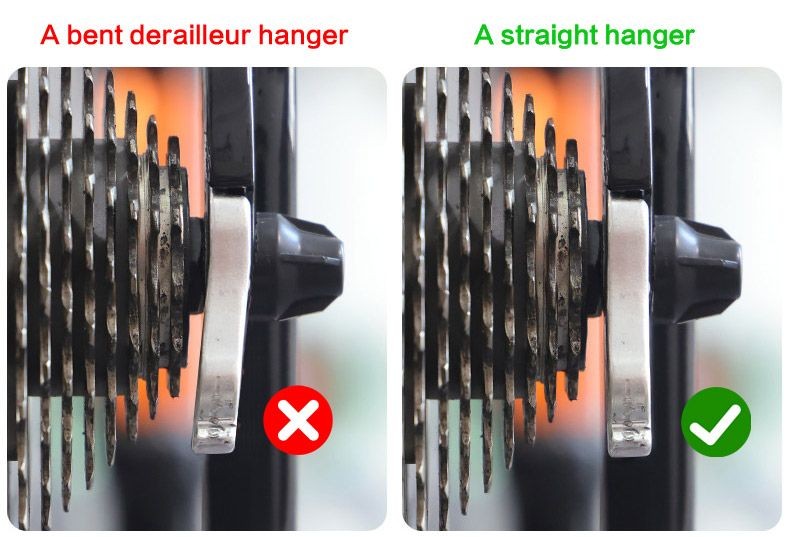
Bent derailleur hanger compared with a straight hanger

A bent hanger tilts the rear derailleur, which causes poor shifting, chain noise and difficult calibration, no matter how carefully it is set up.

How to check: look from behind the bike. The hanger should hang straight down, parallel to the cassette cogs. If it is bent, straighten it with a hanger alignment tool or fit a new hanger.

Check 2

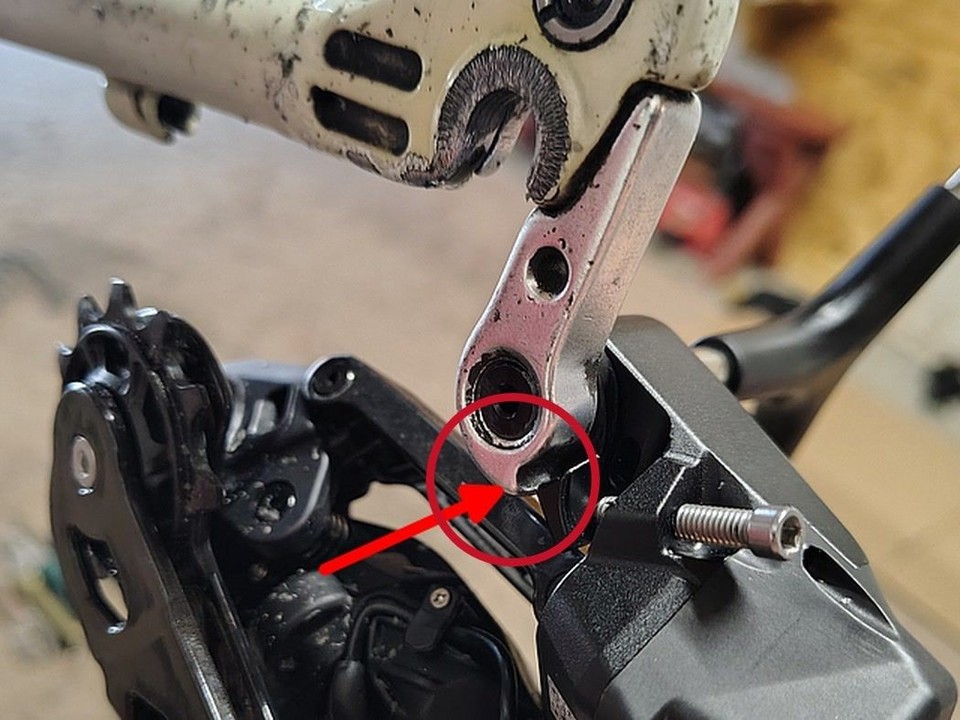
Does the Hanger Have a Step?

Derailleur hanger with a clear step: compatible
Compatible

Clear step at the bottom

Derailleur hanger with a very small step: not compatible
Not compatible

Very small step

The small tab next to the mounting bolt must rest on the step at the bottom of the hanger, so the derailleur can swing forward and back.

Small step? Fit a hanger with a larger step, or a derailleur hanger extender. Otherwise the derailleur stays rigid and cannot be set up.

Not sure? Send us a close-up photo of your hanger by email to support@aoeagle.com before ordering, and we will check it for you.

Compatibility & Buyer Notes

Please review the following before purchasing to ensure correct fitment.

Threaded Bottom Bracket Shell Required

The included crankset uses a BC1.37"×24T threaded (BSA/English) bottom bracket, 68-73mm wide. It is not compatible with press-fit shells (BB86/BB92/PF30, etc.). Confirm your frame has a threaded BSA-style BB shell before ordering.

This Listing is for Rim Brake Only

The levers included are rim brake levers and the calipers are rim brake calipers — compatible with standard caliper brake cable pull. If you ride a disc-brake frame, please see our separate disc brake listing. Rim and disc brake components are not interchangeable.

App Pairing Required Before First Ride

After installation, pair both derailleurs to the WHEELTOP app over BLE, set your speed range, and run gear calibration. The app is free on iOS and Android.

Chain Needs Trimming to Fit

The chain ships at 126 links, the standard length for most road frames. It should be sized to your specific chainring/cassette/frame combination during installation using a chain tool.

Reviews

Reviews from our eBay store (aoeagle).

Feedback from buyers in our eBay store. It covers our whole store; the tabs show feedback for this item or for all items.

Loading reviews…

Prices, discounts or availability mentioned in creator videos may be out of date. The current price is the one shown on the product page at aoeagle.com.

Which brand of cassette does it support?

The app lets you set the speed count and gear spacing: the TX supports 7–14 speed cassettes, Shimano and SRAM alike — just pick the matching speed in the app.

How to pair the app?

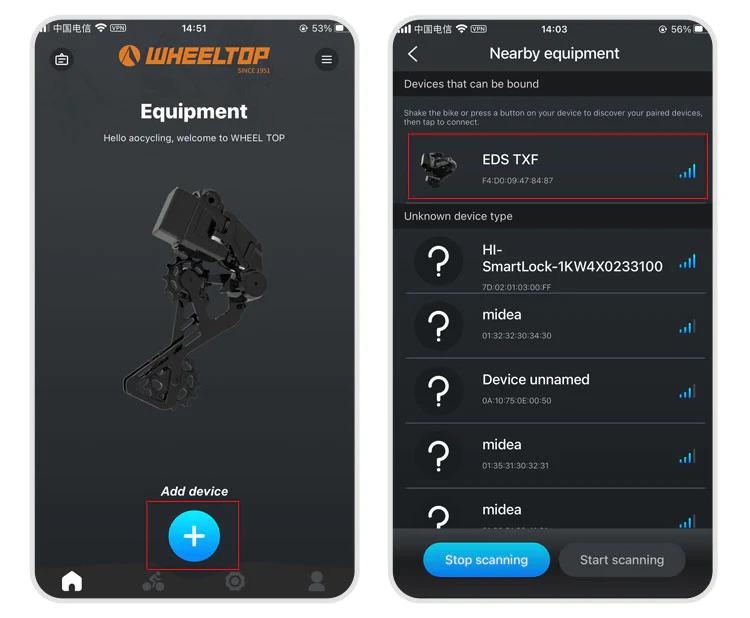
On the home page, click the [Add Device] button. The APP will automatically navigate to the nearby devices list page. Locate your device's MAC address, then click to add and bind it. After successful binding, you will need to name the device.

Step 1: Click the Add button on the home page Step 2: Turn on your phone’s Bluetooth to search for nearby devices
How to pair the app? illustration

Step 3: Select nearby bindable devices to add Step 4: Name the device
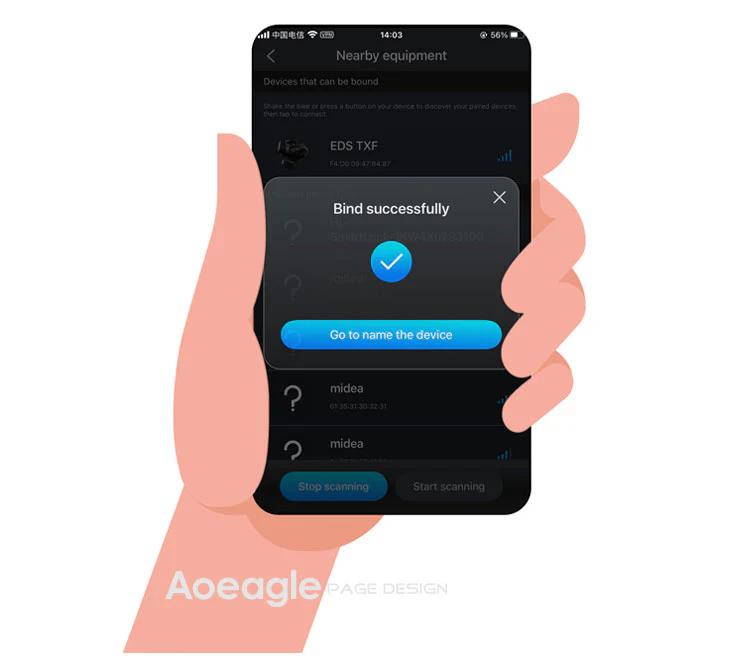
How to pair the app? illustration

One last thing — and this is where a lot of users get stuck.

To connect, you need to tap the Bluetooth icon in the app. Before doing so, make sure the derailleur hasn't gone into sleep mode. If it has, just give the derailleur a tap or shake the bike to wake it up. Once the connection is successful, the Bluetooth icon will light up — and you're all set to start adjusting your derailleur.
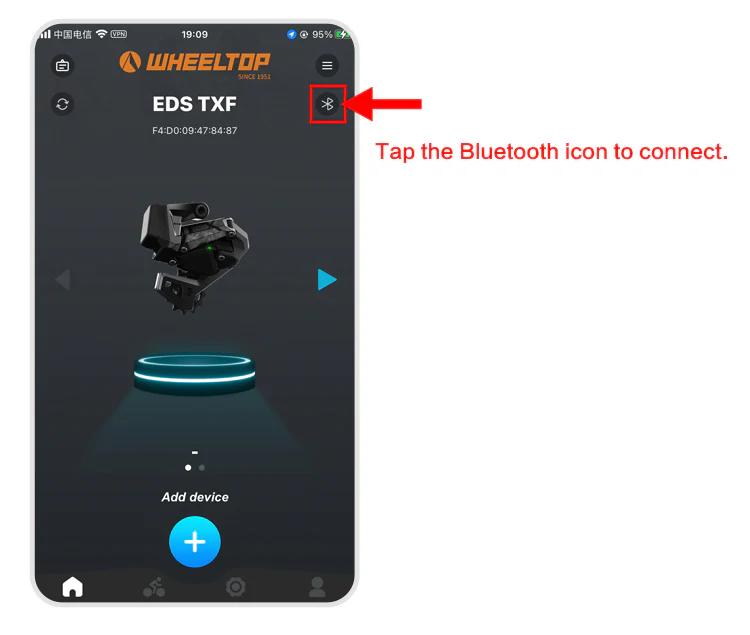
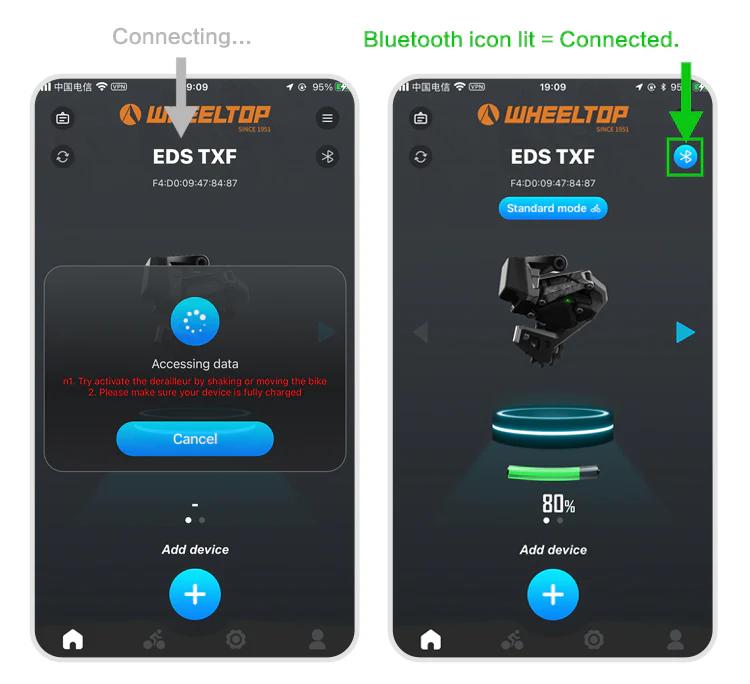
How to pair the app? illustration How to pair the app? illustration
How to do the initial calibration?

For EDS TX series:

  1. Set the front derailleur to the largest sprocket
  2. Set the rear derailleur to the smallest cog position
  3. Open the WHEELTOP App → Initial Calibration
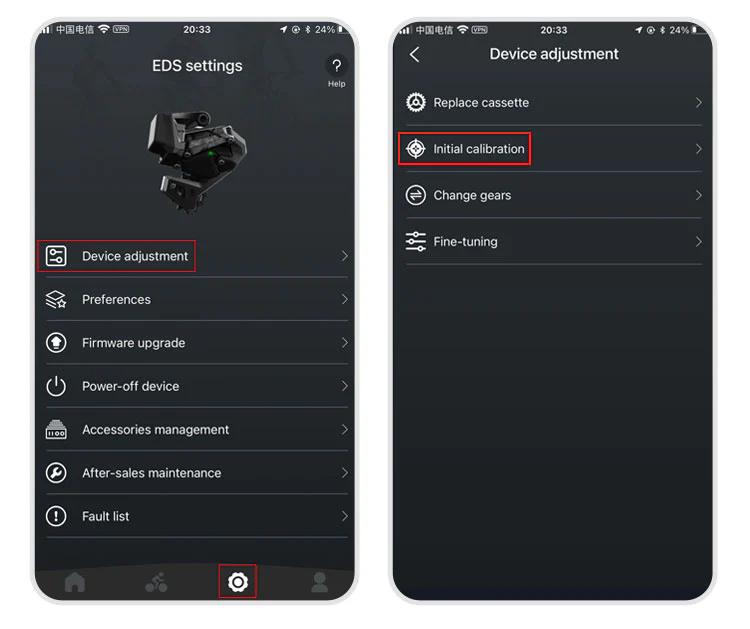
How to do the initial calibration? illustration

Use "<" or ">" buttons to align the RD pulley with the smallest cog
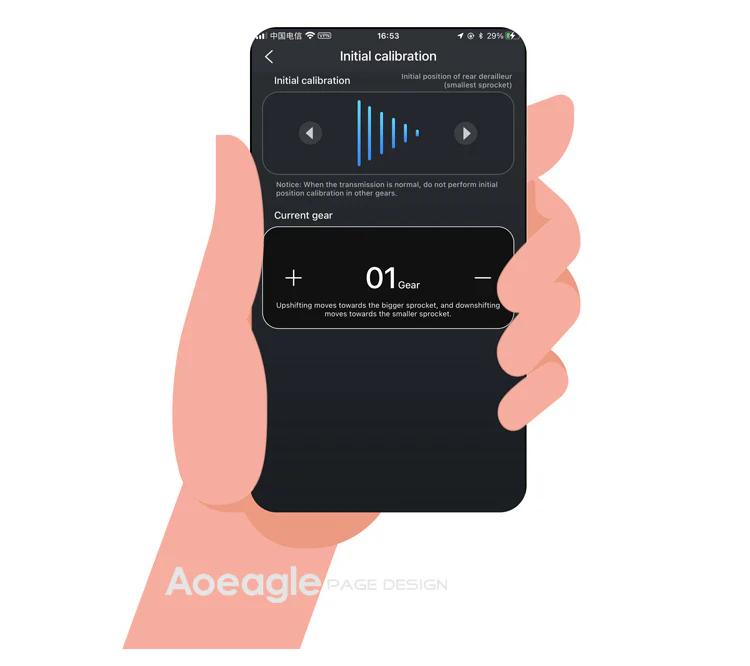
How to do the initial calibration? illustration

Exit the initial calibration page

For EDS GeX and OX series: Same steps but skip step 1 (no FD adjustment required).

How to download and register the WHEELTOP app?

WHEELTOP APP download:

How to download and register the WHEELTOP app? illustration

app Store

How to download and register the WHEELTOP app? illustration

Google Play

After successful registration, log in to the app.

You can also download the APK file directly: APK Download Link

For first-time use, please register with your email.

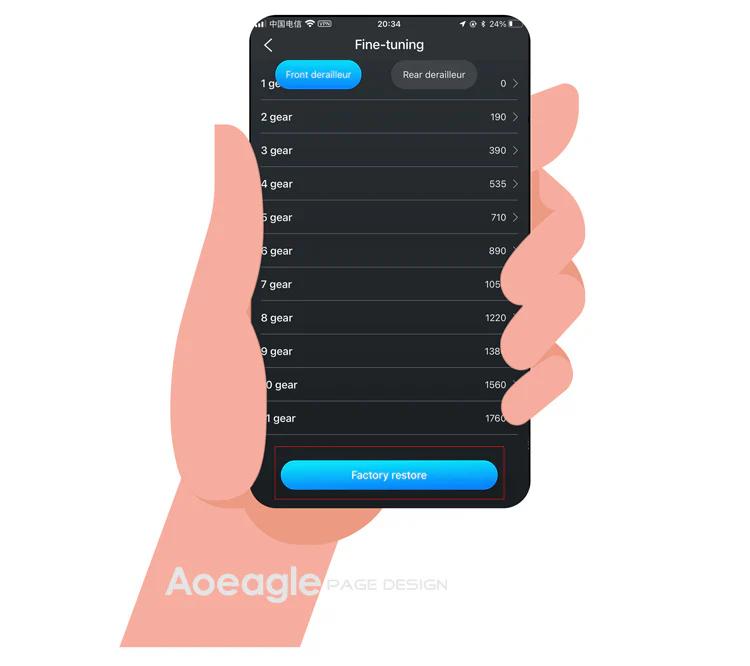
How to perform a factory restore?

It works like a factory reset for gear values. Use it when gear values have been misadjusted to restore the preset values.

Path: APP → Settings → Device-adjustment → Fine-tuning → "Factory-restore" button at the bottom.
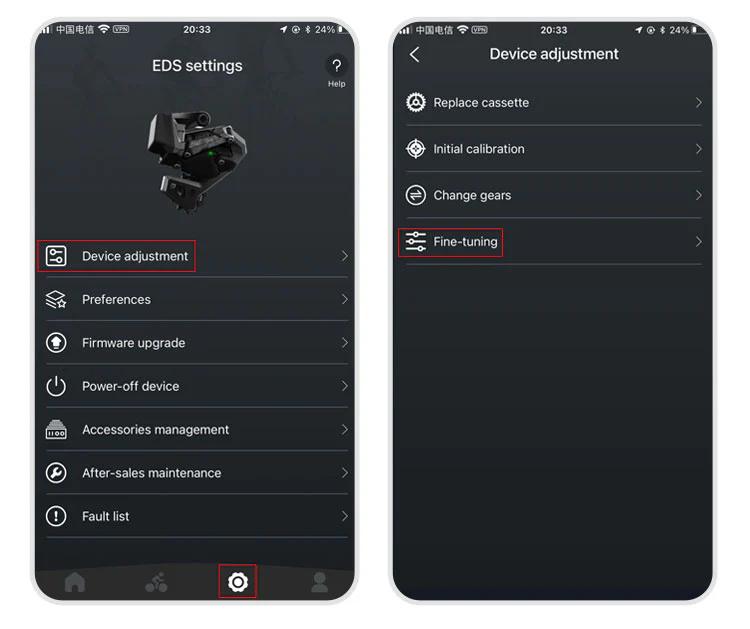
How to perform a factory restore? illustration How to perform a factory restore? illustration
The rear derailleur position is inconsistent with the APP display

1.Go to the initial calibration page in the APP 2.Select the rear derailleur (upper section) 3.Press the right arrow (▶) and hold until the RD moves back to the smallest cassette

More questions (10)
The device cannot shift immediately after not riding for a long time

1.Charge the system — a low battery can delay activation 2.Gently shake the frame — this helps wake up the rear derailleur more quickly

Can EDS be paired with bike computers?

Yes!EDS TX, OX2.0, and GeX can all be paired with bike computers.

How do I power off and power back on my WHEELTOP EDS device?

In the latest version of the WHEELTOP app, swipe left on the rear derailleur's device card to bring up the **Disconnect / Power Off** menu, then tap **Power Off**. This is useful for shutting the system down during shipping or storage. To power the device back on, plug in the magnetic charging cable for **2-3 seconds** — once the charging indicator light turns **red**, the device powers on and reactivates.

WHEELTOP app screen showing the swipe-left Disconnect / Power Off menu
How do I achieve the most precise and smooth shifting with my EDS TX groupset?

Getting competition-grade shifting out of the EDS TX takes more than a quick app pairing. Follow this step-by-step setup protocol to make sure your system runs flawlessly across every gear.

Phase 1: Before You Start — Three Golden Rules

1. Derailleur Hanger Alignment

This is the single most important step. Even a slightly bent hanger will prevent the system from shifting with 100% consistency. Use a proper alignment tool or take the bike to your local shop before doing anything else.
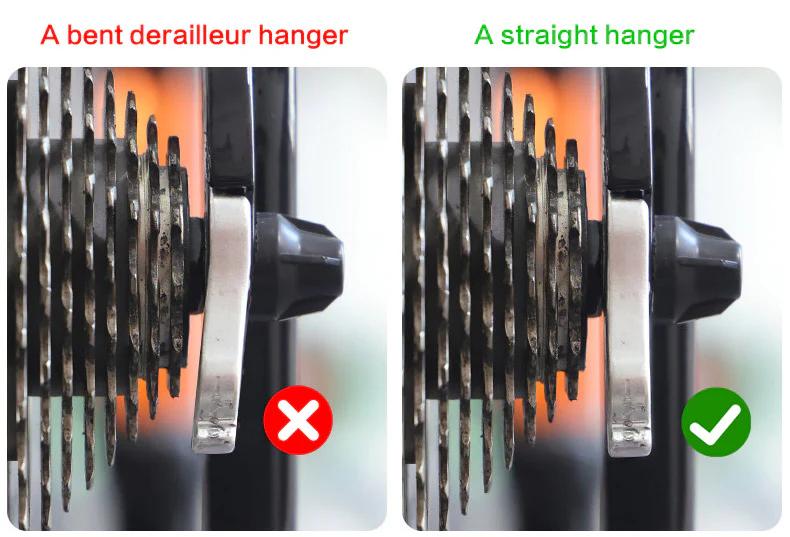
How do I achieve the most precise and smooth shifting with my EDS TX groupset? illustration

2. Keep Your Drivetrain Consistent

For the best results, avoid mixing cassettes and chains from different brands. Matching components means the cassette ramp profiles and chain plates work exactly as intended — and shifting feels it.

3. Waxed Chain? Check for Stiff Links

If you run a waxed chain, make sure there are no stiff links and wipe off any excess wax from the outer plates. Built-up wax can stop the chain from dropping cleanly onto smaller cogs.

Phase 2: Step-by-Step Tuning Protocol

Step 1 — Initial Positioning (Smallest Cog)
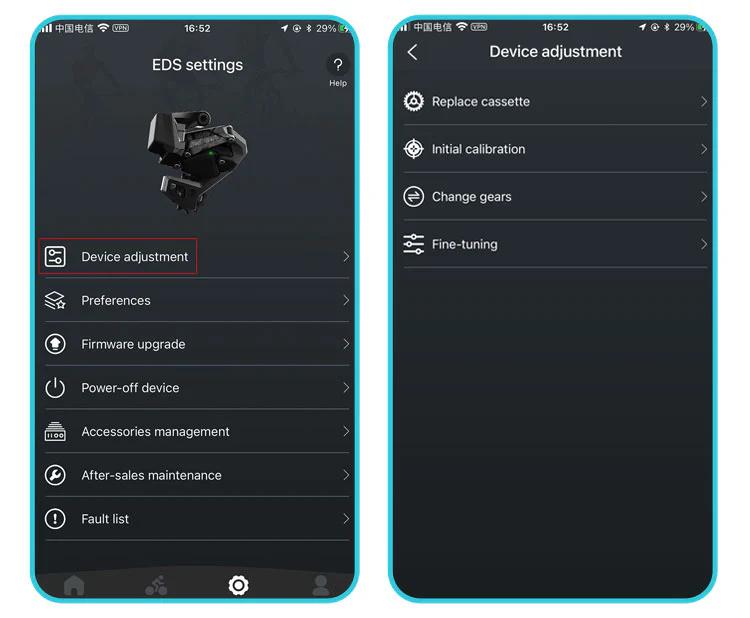
How do I achieve the most precise and smooth shifting with my EDS TX groupset? illustration
  • Select your cassette size in the Wheeltop App.
  • Shift the chain to the smallest cog and the largest chainring
  • Important: Back the mechanical limit screws out completely — don't use them to set position yet. Let the motor do the work at this stage.
  • Use the app's micro-adjustment arrows to align the top jockey wheel directly under the smallest cog until the chain runs completely silent.
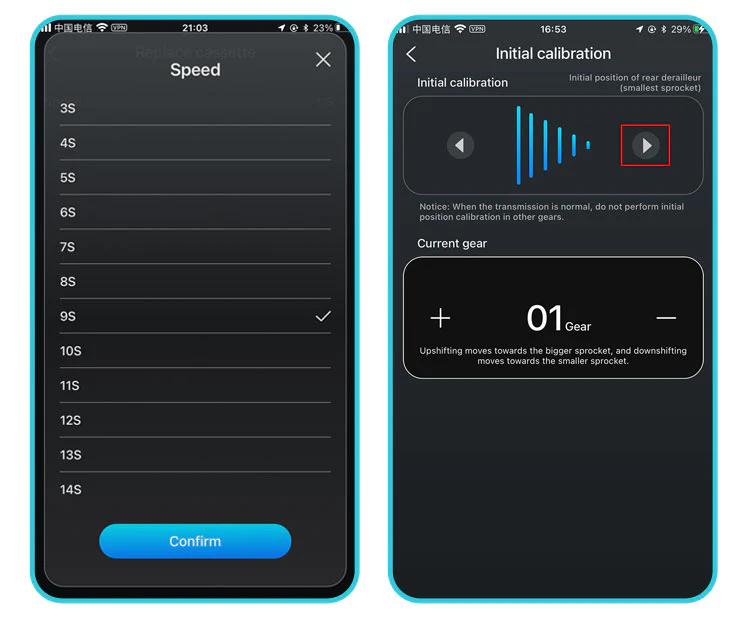
How do I achieve the most precise and smooth shifting with my EDS TX groupset? illustration

Step 2 — Fine-Tuning Across the Cassette (The 10-Unit Rule)

  • Open the Fine Tuning section in the app.
  • Shift up one cog at a time. If a shift feels rough or noisy, adjust in increments of 10 units.

Pro TipA new setting doesn't register until you shift back down to the previous cog, then back up to the one you adjusted. Work through the entire cassette this way for a fully "mapped" drivetrain.
How do I achieve the most precise and smooth shifting with my EDS TX groupset? illustration

Step 3 — B-Gap (Tension Screw) Adjustment

Skip the guesswork of a specific measurement. Instead, dial the B-screw until the jockey wheel is as close to the cassette as possible without any rumble or interference during shifts. Do this check in the smallest chainring, where chain angle is at its most extreme.

Step 4 — Front Derailleur (FD) Calibration

  • Use Initial Calibration only for the FD — avoid Fine Tuning unless you have a specific reason.
  • With the chain on the smallest cog / large chainring, adjust the FD outward until there's no chain rub — but make sure it doesn't touch the crank arm while pedaling.

Auto-TrimThe EDS TX automatically micro-adjusts the front derailleur as you shift through the rear cassette to prevent chain rub. Some light rub in extreme cross-chain positions (large/large or small/small) is normal — and those combinations are best avoided on the trail anyway.

Step 5 — Mechanical Limit Screws (Safety Backup)

  • Only adjust the limit screws after the electronic setup is fully dialed in.
  • Thread each screw in until it just makes contact with the derailleur body, then back it off 1/8 to 1/4 turn. This keeps the screw acting as a mechanical stop without interfering with the motor's travel range.

Still getting front derailleur rub? Try slightly loosening the FD mounting bolt, physically rotating the cage by a degree or two, then retightening. A small real-world angle adjustment often solves what software tweaks can't.

Why are there 6 gear values for FD fine-tuning? What do they mean?
  1. Gear 1st: Press and hold left shifter — FD moves from small to large chainring.
  2. Gear 2nd: FD on large chainring, RD on smallest 6 cogs — fine position value.
  3. Gear 3rd: FD on large chainring, RD on largest 6 cogs — fine position value.
  4. Gear 4th: FD on small chainring, RD on smallest 6 cogs — fine position value.
  5. Gear 5th: FD on small chainring, RD on largest 6 cogs — fine position value.
  6. Gear 6th: Press and hold left shifter — FD moves from large to small chainring.
What should I do if the derailleurs are stuck or can't shift?

Use the "Initial Calibration" function in the WHEELTOP app to adjust the front derailleur. Adjustment must always start from the default position.

Correct default position:

  • Set the FD at the largest chainring position
  • Set the RD at the smallest cog position
  • Use the initial calibration function in the app to adjust the FD towards the largest chainring position

Steps in the APP:

  1. Open the WHEELTOP app → Equipment Debugging → Initial Calibration
  2. Use the '<' or '>' buttons to adjust the FD guide plate position until correct
How does the rear derailleur linkage function work with limit function enabled?

When the FD is on the large chainring, RD is below 3rd gear, and limit is enabled:

  • RD Upshift: System executes an RD upshift once every 0.5 seconds.
  • RD Reaches 3rd Gear: The RD upshifts until reaching 3rd gear.
  • FD Downshift: Once RD reaches 3rd gear, system waits 2 seconds before executing the FD downshift.
After pressing the shifter lever, the rear derailleur does not shift normally

1.Check the button indicator light: If there is no light, replace the battery and test again. 2.Check the light color: If the button is lit but not green (e.g. red or yellow), the device is not paired correctly. Re-pair following the manual.

What brake systems are compatible with EDS TX?

Cable Brake Groupsets are compatible with rim brakes, V-brakes, U-clamps, and pull-cable disc brakes.

Hydraulic Disc Brake Groupset uses mineral oil, designed for Shimano's hydraulic brake system, compatible with L04C, L05A, and L04A brake pads.

What is the length of brake cables? Are they standard mechanical brake lines?

Our EDS TX/GEX Cable Brake Groupsets use standard mechanical disc brake cables, widely available in the market. Each set includes two brake cables. The length should be sufficient for most bikes.