
Enter code SAVE20 in your cart or at checkout on orders £240+ (eligible items £40+, 1 use per customer).
Request a stock update
Questions before you buy? Email us · We reply within 24 hours.

Reviews
Reviews from our eBay store (aoeagle).
Feedback from buyers in our eBay store. It covers our whole store; the tabs show feedback for this item or for all items.
Loading reviews…
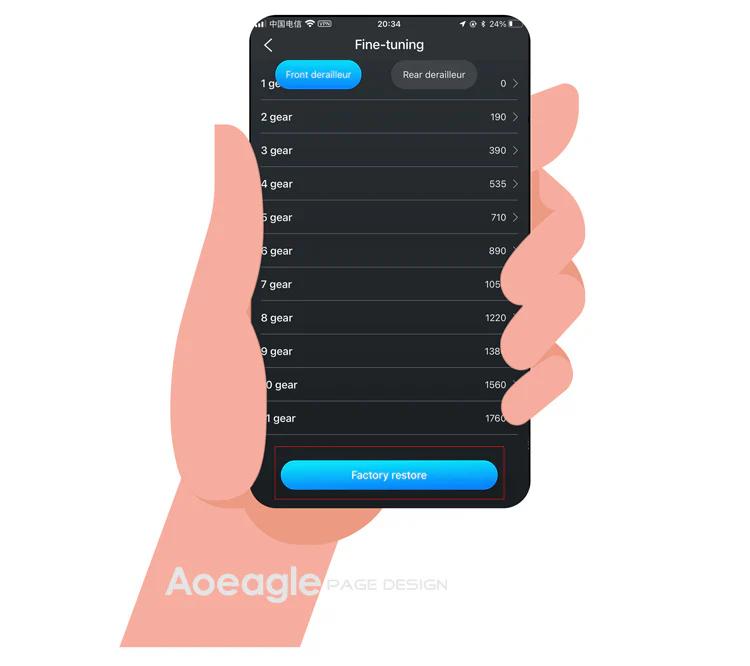
Why are there 6 gear values for FD fine-tuning? What do they mean?
- Gear 1st: Press and hold left shifter — FD moves from small to large chainring.
- Gear 2nd: FD on large chainring, RD on smallest 6 cogs — fine position value.
- Gear 3rd: FD on large chainring, RD on largest 6 cogs — fine position value.
- Gear 4th: FD on small chainring, RD on smallest 6 cogs — fine position value.
- Gear 5th: FD on small chainring, RD on largest 6 cogs — fine position value.
- Gear 6th: Press and hold left shifter — FD moves from large to small chainring.
What should I do if the derailleurs are stuck or can't shift?
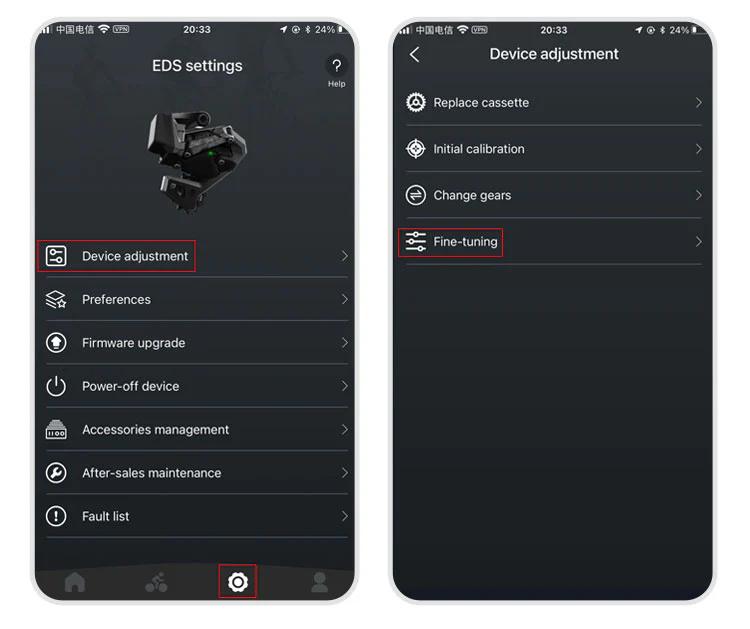
Use the "Initial Calibration" function in the WHEELTOP app to adjust the front derailleur. Adjustment must always start from the default position.
Correct default position:
- Set the FD at the largest chainring position
- Set the RD at the smallest cog position
- Use the initial calibration function in the app to adjust the FD towards the largest chainring position
Steps in the APP:
- Open the WHEELTOP app → Equipment Debugging → Initial Calibration
- Use the '<' or '>' buttons to adjust the FD guide plate position until correct
How does the rear derailleur linkage function work with limit function enabled?
When the FD is on the large chainring, RD is below 3rd gear, and limit is enabled:
- RD Upshift: System executes an RD upshift once every 0.5 seconds.
- RD Reaches 3rd Gear: The RD upshifts until reaching 3rd gear.
- FD Downshift: Once RD reaches 3rd gear, system waits 2 seconds before executing the FD downshift.
How to pair the app?
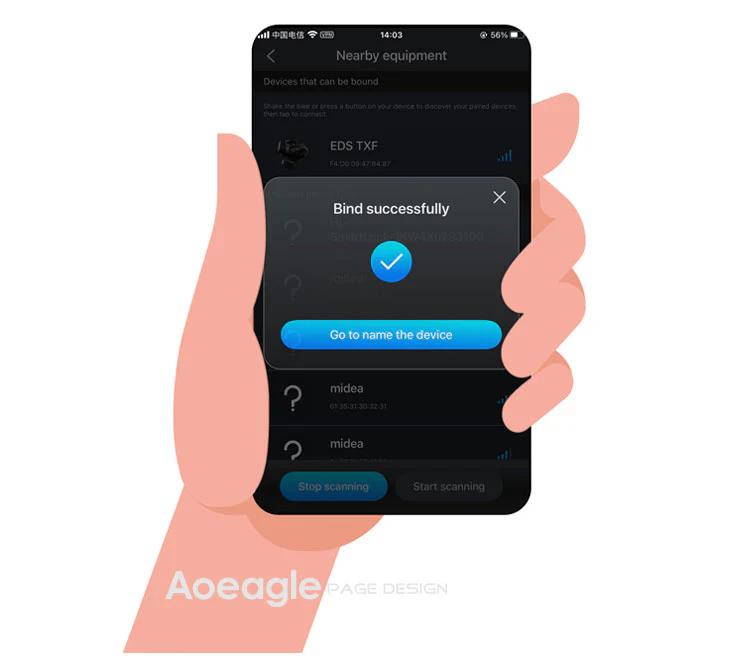
On the home page, click the [Add Device] button. The APP will automatically navigate to the nearby devices list page. Locate your device's MAC address, then click to add and bind it. After successful binding, you will need to name the device.
Step 1: Click the Add button on the home page Step 2: Turn on your phone’s Bluetooth to search for nearby devices
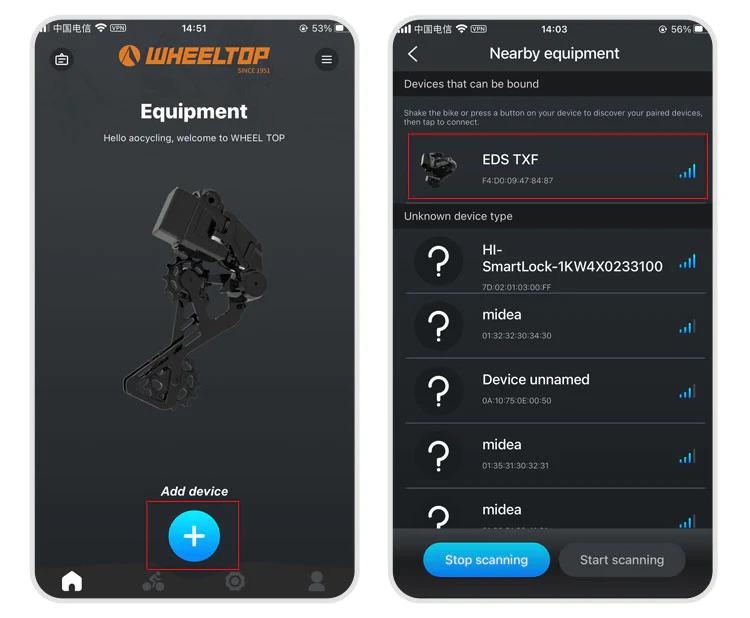
Step 3: Select nearby bindable devices to add Step 4: Name the device
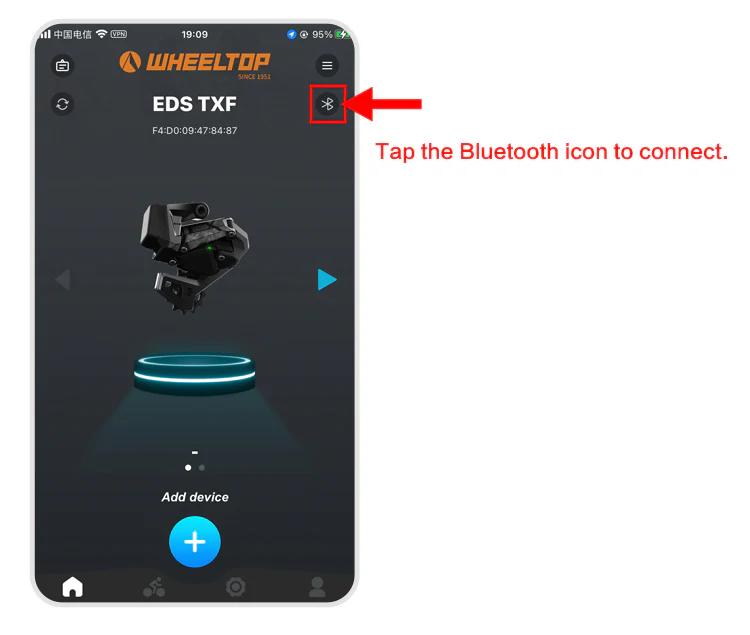
One last thing — and this is where a lot of users get stuck.
To connect, you need to tap the Bluetooth icon in the app. Before doing so, make sure the derailleur hasn't gone into sleep mode. If it has, just give the derailleur a tap or shake the bike to wake it up. Once the connection is successful, the Bluetooth icon will light up — and you're all set to start adjusting your derailleur.
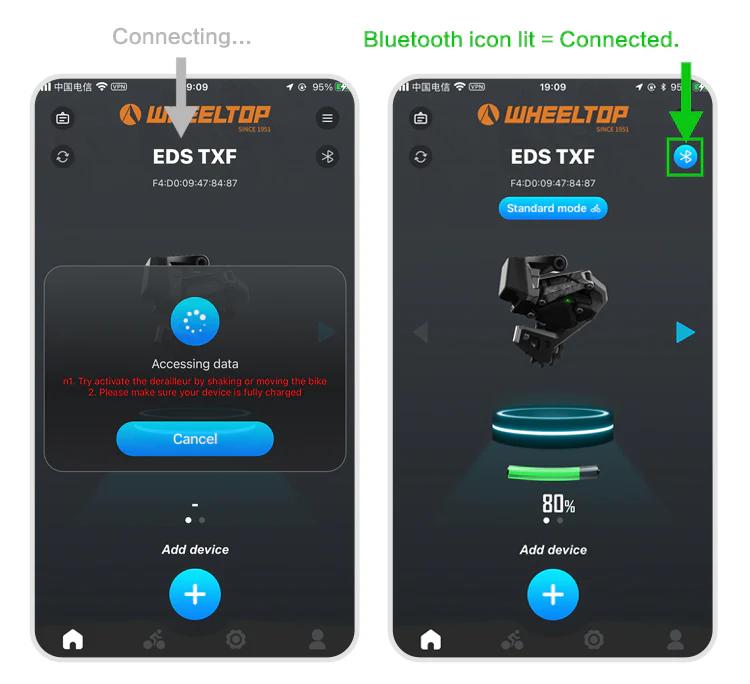
How to download and register the WHEELTOP app?
WHEELTOP APP download:


After successful registration, log in to the app.
You can also download the APK file directly: APK Download Link
For first-time use, please register with your email.
How to perform a factory restore?
It works like a factory reset for gear values. Use it when gear values have been misadjusted to restore the preset values.
Path: APP → Settings → Device-adjustment → Fine-tuning → "Factory-restore" button at the bottom.